AI Video Generation API: Jobs, Models and Costs
Learn how an AI video generation API works, from async jobs and webhooks to model choice, output checks and true cost per usable clip.

Your chat completion returns in 400 milliseconds, so you wire video the same way: one POST, wait, collect the bytes. Four minutes later the connection times out, the clip finishes anyway, and you've paid for a job nobody collected.
That gap is where most ai video generation API projects go wrong. Documentation makes video look like a slower chat model, and pricing tables push you to compare cents per second as if a second of generated footage were a unit you always get to keep. The market is expanding fast enough that the mistake scales. Research and Markets valued the global AI video generator and editor market at USD 623 million in 2024 and projects USD 3.51 billion by 2034 at an 18.64% compound annual growth rate (Research and Markets, December 2024).
The useful question isn't which API is cheapest per second. It's what one usable, downloaded, archived clip costs after the failures, the retries and the model that needed four attempts.
Table of Contents
- Video Generation Capabilities and Request Types
- How a Video Job Moves From Submission to File
- Polling or Webhooks for Finished Video Results
- Choosing a Video Model by Use Case
- Cost per Usable Clip Versus Advertised Price
- Request Fields and Output Metadata to Check
- Integrating Video Generation Into Existing SDK Code
- Production Failures and How to Prevent Duplicates
- Run a Model Benchmark Before You Commit
Video Generation Capabilities and Request Types
A chat reply is one message. A video job is a file that arrives later, and the request type you pick decides what the provider has to invent and what it hands back.
Text to video is the purest form. You send a prompt and a model identifier, and the model generates every pixel from the description. Image to video adds a reference image, so subject, framing and lighting come from the image while the prompt supplies the motion. That single change removes most of the identity drift that makes text-only clips unusable for product shots and character work.
| Request type | Input | Execution | Output |
|---|---|---|---|
| Text to video | Text prompt and model identifier | Asynchronous job | New MP4 clip |
| Image to video | Reference image and prompt | Asynchronous job | MP4 clip anchored to the image |
| Video upscaling | Existing video file | Asynchronous job | Higher-resolution MP4 |
| Video with audio | Prompt plus audio setting | Asynchronous job | MP4 with an audio track where the model supports it |
Video upscaling is the one type where the content is fixed and only the resolution changes, so it's the easiest to cost and the hardest to get wrong. Audio splits in two. Some models return a soundtrack alongside the picture when you switch audio on, while music and sound effects are separate modalities using the same request shape and the same job mechanics.
Three inputs appear in every row: the prompt or source media, the model identifier, and the length and resolution you want. Get those three into your own request schema early and swapping providers later becomes a configuration change.
Set the timing expectation before you build anything. A chat reply lands in seconds, while a video request is accepted first and finishes later, with a typical run taking about 30 seconds to several minutes. The response you get back immediately is a job, not a clip.
How a Video Job Moves From Submission to File
Every production-ready video API follows one pattern, and it's the pattern OpenAI documents in its video API guide: create a job, read its status, then fetch the content once the status reaches a terminal success state. Model that flow as an asynchronous job system, never as a synchronous media download.
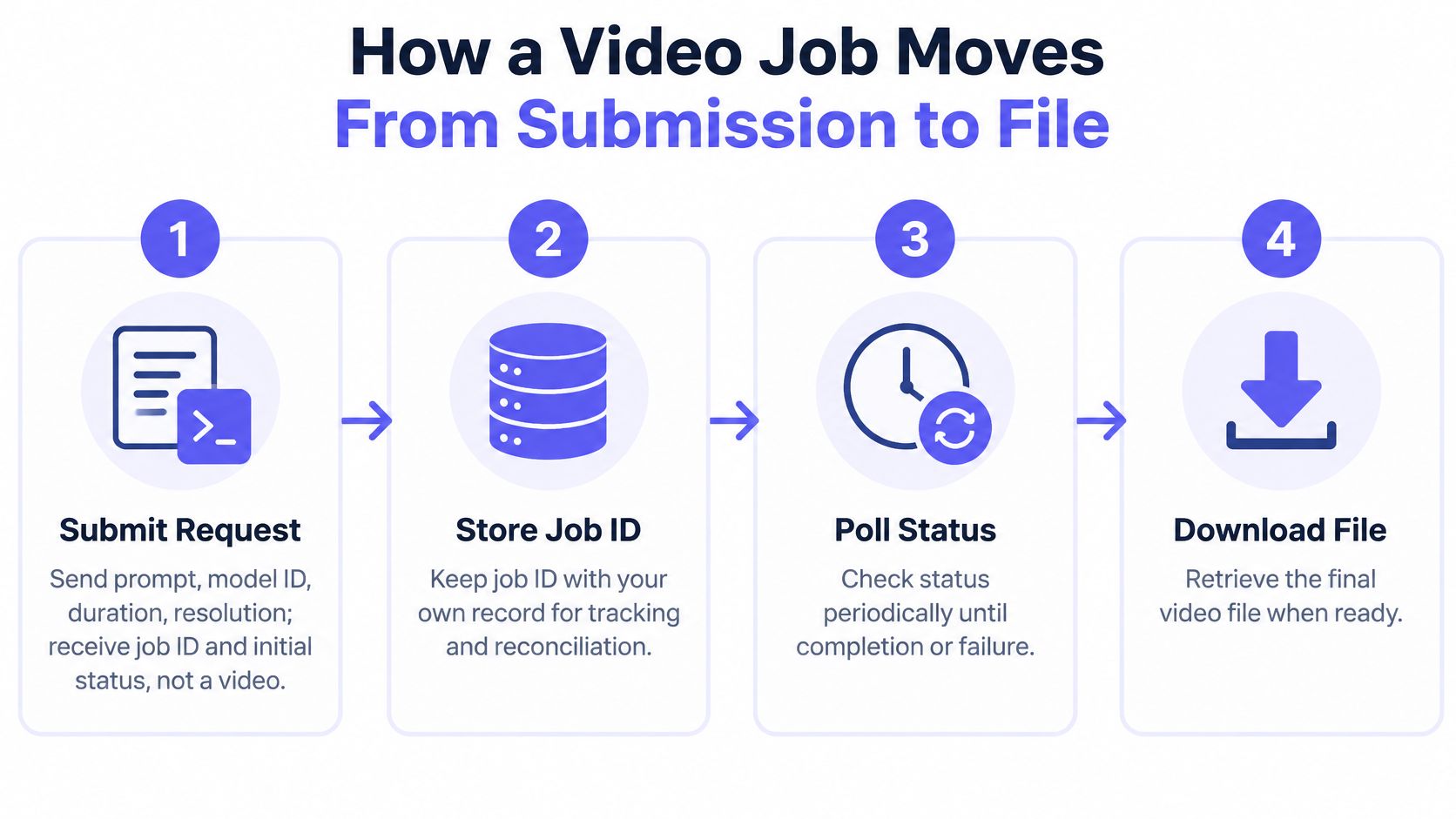
- Submit the request. Send the prompt, model identifier, duration and resolution. The response carries a job ID and an initial status such as queued. Store it before you do anything else, because a process restart otherwise loses the only handle on work you've already paid for.
- Map the job ID to your own record. Keep your internal request ID, the user or tenant it belongs to, the parameters you sent, and the seller or provider route. When a billing question arrives three days later, this row is the answer.
- Watch the status resource. Poll it or wait for an event, and record each transition with a timestamp. Queued, running, succeeded, failed. The gap between queued and running is queue wait, and it's the number that explains "slow model" complaints that have nothing to do with the model.
- Wait for a terminal state. Success and failure are both terminal. A timeout is not, and neither is a dropped connection, so never treat either as an outcome.
- Fetch the file on success only. Request the content location, stream it to your own storage, and record the checksum. Doing this at failure time wastes calls and can mask a real error as a download problem.
- Read the error on failure. Decide whether the fix is a changed parameter, a different model, or a message to the user. Resubmitting identical parameters after a content rejection just burns money.
What healthy job logs look like
One job ID, one clean run from queued to running to succeeded, and exactly one download. Anything else in the log is a bug you can measure: two downloads means a duplicate webhook you didn't dedupe, and a success recorded after your client gave up means you need reconciliation.
Define cancellation, timeout, retry and expiration on your own job record. Those semantics belong to your gateway, not to whichever upstream rendered the clip. If the caller disconnects mid-render, let the job finish and reconcile it later. Cancellation is an explicit status change you send, not an HTTP connection that happens to close.
Polling or Webhooks for Finished Video Results
Both signals answer the same question, and they differ in who does the chasing. Polling means your code repeatedly reads the status resource until the job reaches a terminal state. Webhooks mean the provider calls you with a completed or failed event, and your endpoint reacts.
| Question | Polling | Webhooks |
|---|---|---|
| How you learn the result | Repeated status reads until terminal | A completed or failed event |
| When you notice | At the next interval | When the event is delivered |
| Extra load | One status call per interval | Almost none, plus a rare reconcile |
| Best fit | Batch rendering and a simple first build | Long-running, event-driven generation |
| Main failure | Detection waits on the interval | Missed or duplicate delivery |
| Safety control | Back off from about 15 seconds toward 60 seconds | Verify the signature, persist by job ID, treat delivery as at-least-once, skip a repeat download and billing |
For generations measured in minutes, events win on both cost and latency. The request volume from polling every job every few seconds adds up across a queue, and the same traffic delays your detection until the next interval. The comparison of webhooks against direct API polling sets out where each pattern fits.
Build the handler with five checks in this order:
- Verify the signature when the provider supplies one, and reject unsigned deliveries at the edge.
- Persist the event against the provider job ID before any download, billing or notification work runs.
- Assume at-least-once delivery, because the same completed event can legitimately arrive twice.
- Make the handler idempotent, so a second delivery sees a stored terminal state and skips the download and the charge.
- Handle the failed event as a real outcome, not as a timeout to be retried blindly.
Then add the safety net. If no event arrives by a deadline set from your measured latency, poll the job ID with backoff, starting around 15 seconds and stretching toward 60 seconds. Test both failure paths before launch: force a duplicate event, then suppress an event entirely, and confirm the user ends up with one video and one charge.
Practical rule: a webhook is an optimization for the happy path. Your reconciliation poll is what makes the system correct.
Choosing a Video Model by Use Case
Shortlist candidates on five criteria before you look at a leaderboard: the modality you need, the maximum duration and resolution, audio support, measured generation time, and the cost unit the provider bills in. Those five eliminate most of the field faster than any quality ranking.
| Model family | Modality | Cost unit to compare | Known time or price |
|---|---|---|---|
| Kling 3.0 Standard | Text and image to video | Per second | About 80 seconds for one 5-second clip |
| Veo 3.1 Fast | Text to video | Per second at 1080p with no sound | Record latency in your own test, since queue load moves it |
| Veo 3.1 Full | Text to video | Per job | $0.22 per job against a $0.44 list price |
| Seedance 2.0 Fast | Image to video at 480p, 5 seconds | Per clip | $0.35 per clip against a $0.29 rival listing |
| LTX 2.3 | Text to video at 1080p | Per second | $0.06 per second at 1080p |
| Wan 2.6 | Text to video | Per job | $0.16 per job |
The cost unit matters as much as the number. A per-second price suits clips of variable length and punishes long ones, while a per-job price makes a fixed-length clip predictable and a longer clip free. Compare two models on the same duration and resolution or the comparison means nothing.
Generation time decides whether you can put the model in front of a person. A 5-second Kling 3.0 clip took about 80 seconds in a test on 29 October 2026, which is respectable for a short clip and impossible to hide behind a spinner with no progress state. A 5-second clip that takes 80 seconds needs a visible status, an estimated wait, and a way to leave the page and come back.
Narrow to two or three models in this order: modality first, then resolution and audio, then the speed and cost unit you can live with. Keep at least one fallback in the shortlist even after you pick a default. A model that fits your visual style can still be too slow for your interface, and you want the alternative already benchmarked when that shows up. The full list of AI models available through one endpoint is a reasonable place to start the shortlist rather than opening nine vendor accounts.
Cost per Usable Clip Versus Advertised Price
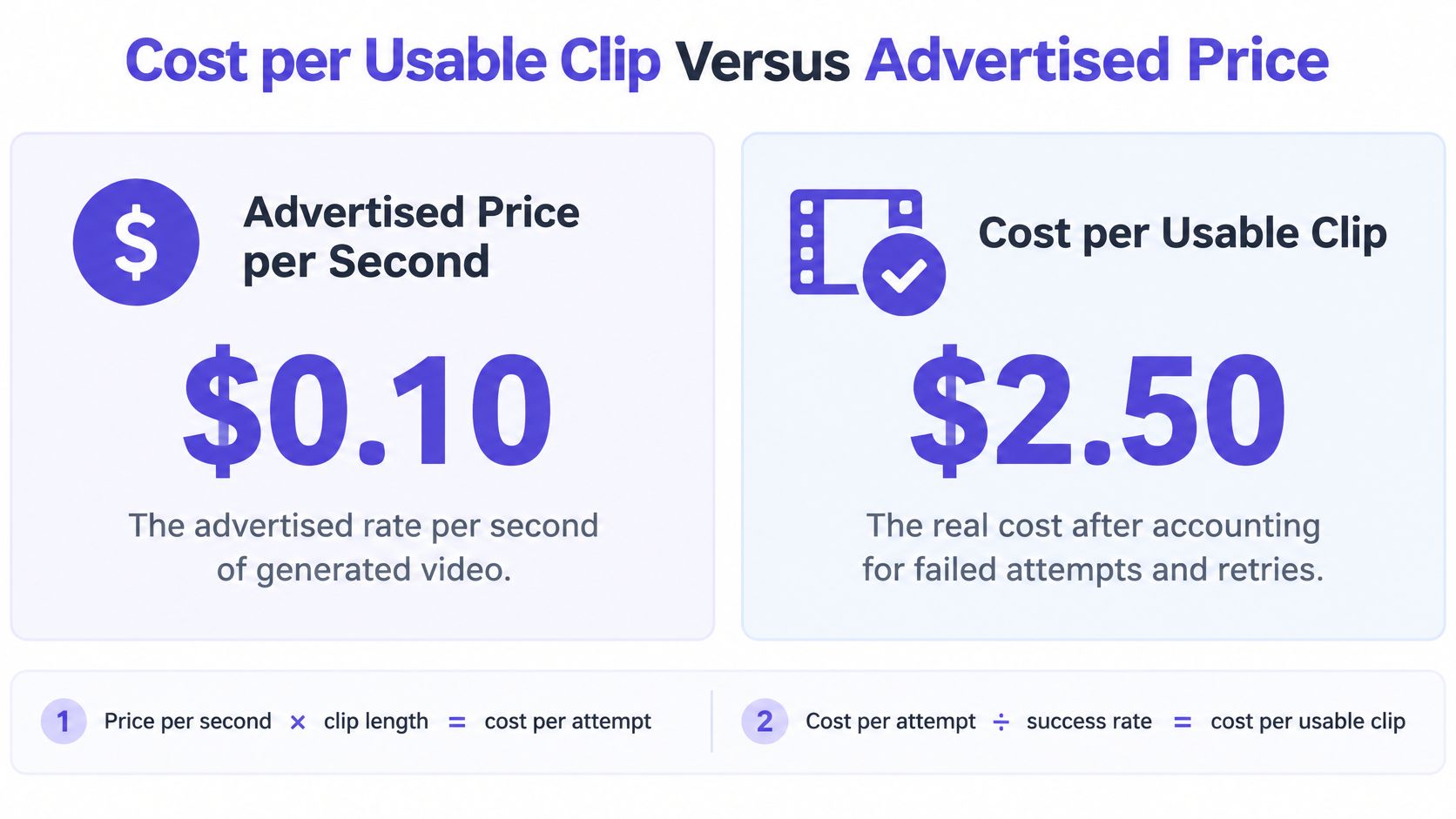
The advertised rate per second tells you what one attempt costs. It says nothing about what a usable clip costs, and that's the number your finance team cares about.
Run the arithmetic with a concrete case. At $0.10 per second, a 5-second clip costs $0.50 per attempt. If one attempt in four clears your quality bar, the accepted clip costs $2.00. A rival at $0.07 per second costs $0.35 per attempt, and if one attempt in two is usable, the accepted clip costs $0.70. The cheaper-looking model wins by nearly three times, and the per-second table showed the opposite ranking.
What the price tables leave out
Published rates cluster between roughly $0.02 and $1 per generated second, according to Runway's pricing comparison for AI video APIs, and that spread is measured before the costs that decide real budgets. The same analysis notes that a cheaper model can end up more expensive when it needs four attempts instead of one. Add these to your model:
- Failed and moderated jobs. A rejection consumes a request and returns nothing you can use, so it belongs in the denominator of your success rate, not outside it.
- Retries you chose. Every resubmission is another attempt cost, which is why the attempt count belongs in the formula rather than in a separate note.
- Settings that move the rate. Resolution and audio change the price per second, so a benchmark run at default settings quotes a price you may never pay.
- Default durations you didn't set. A provider default of 8 seconds when you wanted 5 raises the cost per clip by 60%.
- Storage and re-hosting. A result link is temporary. Copying the file to your own bucket is part of the accepted-clip cost.
Billing rules shape the arithmetic too. A video is billed at its final price once generation completes, and the reply to a request states the most the job can cost before the video starts, which is what lets you set a budget cap per job and per tenant. Those two rules turn a vague monthly estimate into a per-request ceiling you can enforce in code.
Define acceptance narrowly. A job that reports success is not a usable clip. Count it only when it passes prompt adherence, holds temporal consistency, keeps subject identity, and shows no obvious motion or physics error. For a fuller breakdown of how per-second and per-job rates compare across routes, the guide to how AI pricing models work covers the billing units.
A status of success means the render finished. It does not mean the clip is worth shipping, and only the second one goes in the numerator.
Request Fields and Output Metadata to Check
A video request carries more than a prompt. Each field either picks the route, moves the price, or decides whether a good result can be reproduced later. Send these seven:
- The model identifier, which selects the provider route. Identifiers carry structure, so
fal-ai/kling-video/v3/standard/text-to-videoencodes provider, family, version, tier and modality in one string. Keep it in configuration, never hard-coded in request logic. - The prompt, and for image-to-video the reference image or its uploaded location.
- Duration in seconds, because price and generation time both scale with it.
- Resolution and aspect ratio, since both feed into the per-second rate.
- The audio setting, where the model supports audio.
- A seed when the model accepts one, so a good result can be reproduced.
- Your own request ID, so the provider's job maps back to your record.
Output fields to store with every completed task
Container format, video codec, dimensions, frame rate, duration, audio presence and codec, bitrate where available, file size, and a durable content URL or object identifier. Store the metadata beside the file, because the file alone won't tell you next quarter which settings produced it.
Record that metadata rather than assuming every result is equivalent. Two clips with the same duration can arrive in different codecs, at different bitrates, with or without an audio track. The W3C WebCodecs specification defines the interfaces for encoding and decoding audio and video without mandating a codec or an encoding method, so nothing guarantees that two renders come back in the same format.
Deliver a conservative MP4 profile for browsers and apps, and keep the provider-native file when quality matters for a later edit. Then validate before success. Check the decoded duration and frame count against the request, because a file of the wrong length is a failure even when the API reports success. A 4-second clip where you asked for 5 breaks a timeline just as badly as a failed job, and it is far harder to notice.
Integrating Video Generation Into Existing SDK Code
An existing text integration adapts without a rewrite. Keep text and video on separate routes so both can share one API key, one base URL and one balance, and leave the SDK wrapper in place. Moving an OpenAI or Anthropic compatible client is an endpoint and credential change, and switching models is an identifier change.
Four parts of a thin video service
A create function validates input, calls the generation route, and immediately returns your own internal job ID. Your callers never see a provider ID, which is what makes a later failover invisible to them.
A job table maps internal IDs to provider job IDs, status, route, timestamps and output metadata. Treat it as the source of truth for billing reconciliation, not the provider's dashboard.
A worker polls or receives webhooks, advances the state machine, and applies the retry and deadline rules you defined. One worker handles both signals, so a missed event and a slow poll converge on the same code path.
A storage step copies the finished MP4 into your own bucket, computes a checksum and writes the metadata row. This is the step teams skip and then rebuild after their first expired link.
Scope each API key to one environment and keep keys revocable, so a leaked staging key can't reach production capacity. For large source images or video files, upload through a signed URL rather than embedding bytes in the request body, since a multi-megabyte JSON payload is its own failure mode.
Then run the test a senior engineer will ask about. Send a request that times out on the client, and confirm the system ends with exactly one stored task, one eventual download and no duplicate submission. If that test passes, the rest of the integration is detail.
Production Failures and How to Prevent Duplicates
A generation API is not a function call, and treating it like one is where the duplicates come from. With a synchronous text API, a timeout almost always means the work never happened. With video, a timeout means only that you stopped listening. The job may still be queued, still running, and still about to bill you at its final price the moment it completes. The image below shows the operational version of that idea: a pipeline that repairs itself, with someone owning it, rather than a queue nobody watches.
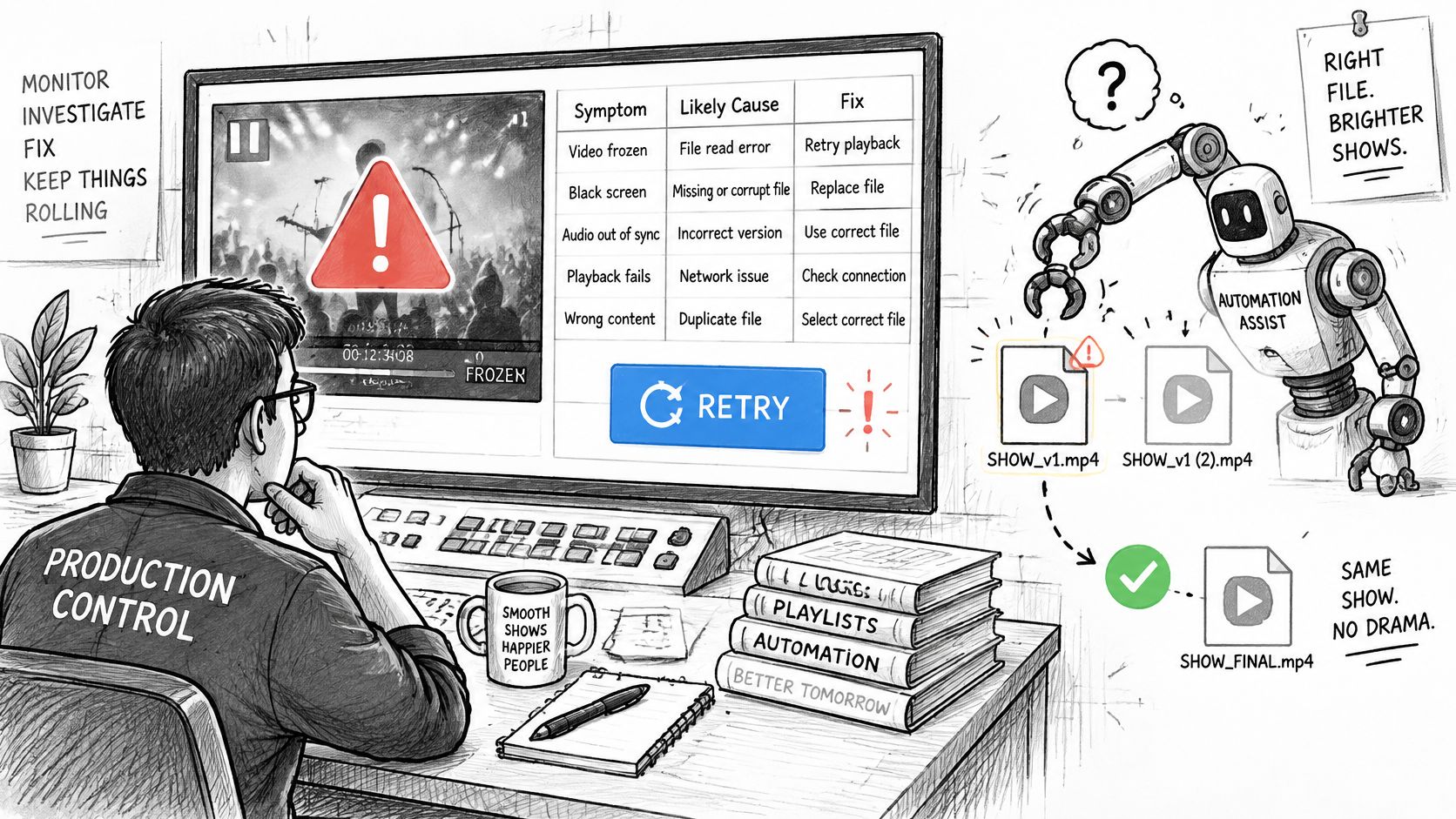
Seven symptoms account for most video integration bugs, and each maps to one cause and one fix.
| Symptom | Likely cause | Fix |
|---|---|---|
| Webhook never arrives | Delivery failure or endpoint timeout | Poll the job ID after a deadline and reconcile the state |
| Same clip created or billed twice | Retry of a non-idempotent generation | Send an idempotency key per user request and reuse the stored job ID |
| Job reports success but file is wrong length | Output validation skipped | Check decoded duration and frame count before marking success |
| Moderation rejection looks like a generic failure | Safety filter stopped the job | Read the error code, change the prompt, do not retry the same input |
| Download fails hours later | Result URL has expired | Download immediately, store the file with a checksum, and archive it |
| Output style changes after failover | A different model or seller served the job | Pin the model for matched clips and fail over only between tested equivalents |
| Many requests look slow | Rate limit or queue wait | Track queue time separately from generation time and set per-job deadlines |
Why automatic failover can cost you money
Failover is a text habit that doesn't transfer cleanly to video. On a chat endpoint, retrying a timed-out request is cheap and the answer is identical either way. On a video endpoint, each resubmission is a new billable job priced per second of output, and a reroute to a different model can change motion, identity consistency, safety outcomes or clip duration. Comparative reporting on the best AI video generation APIs names concurrency limits, rate limits, queue behaviour and slow outliers as the big differences between providers, and average latency hides exactly the tail delays that break interactive products.
So treat retries and failover as spend and consistency risks, not free safety nets. Every duplicate submission raises your cost per accepted clip without raising acceptance. Pin the model for any series of clips that must match, and allow failover only between models you have tested as equivalent on your own prompts. Treat a moderation rejection as a result rather than a transient error: read the code, change the prompt, and don't resend the same input automatically.
The failure mode that catches experienced teams is subtler: a job can reach success after your client request already timed out. If you resubmit instead of reconciling the stored job, you pay for the same clip twice. Result links are also temporary and can expire, so download the finished file immediately, store it with a checksum, and write the archive row. That step is a control, not housekeeping. UberLLM keeps result files for about 3 hours after a video or music job finishes, which is long enough for a retry loop and nowhere near long enough to replace your own bucket.
Exactly-once billing is assembled from parts, each one small on its own: an idempotency key per user request, durable task state, verified webhooks, reconciliation polling after a deadline, checksums on completed media, and immutable archival of every finished file. Skip any one of them and some edge case will eventually find the gap.
The day-one rule: every video job must have a stored state you can reconcile without charging or resubmitting the work. If you can't answer "what did this job cost and did we deliver it" from your own database, the integration isn't finished.
Run a Model Benchmark Before You Commit
You can settle the model choice with a test that fits in an afternoon. Pick one default and one challenger with a different cost unit or speed profile. Kling 3.0 Standard is a practical first default for text to video and image to video, and Veo 3.1 Fast makes a useful cost challenger. Then:
- Reuse the fixed prompts, duration, resolution, audio setting and acceptance rule from your cost model. Identical inputs are the only way a comparison means anything.
- Run at least 10 jobs per model, enough to see a failure rate rather than a lucky run.
- Bring back four numbers only: success rate, median latency, tail latency and cost per accepted clip.
- Check the rate on the route you will call. For the same text to video profile at 1080p with no sound, Veo 3.1 Fast costs $0.075 per second on UberLLM against $0.10 per second on fal.ai, and gaps of that size change which model wins.
- Keep the plumbing separate: video requests go to
/v1/video/generationsand chat requests stay on/v1/chat/completions, even when one API key and one base URL cover both.
Changing candidate is a model-identifier change, so the benchmark costs you prompts and time, not a migration. Choose the route with the lowest cost per accepted clip that still meets your latency and quality bar, pin it for any series that must match, and rerun the same 10-job set each month as prices and queue conditions move.
UberLLM routes video generation across providers behind one OpenAI- and Anthropic-compatible endpoint, so you can submit a job once and let the gateway handle the seller, the job ID and the callback contract. Text to video, image to video and upscaling models sit alongside your chat models on the same key and prepaid balance, and failed generations aren't charged. Point your next video benchmark at UberLLM and compare cost per accepted clip rather than cost per second.