AI Pricing Models Explained: Tokens, Tasks and Costs
Compare AI pricing models: per-token, per-task, subscription and credit billing, plus how to estimate what your inference will really cost.
You've got an AI feature working, and now you're trying to price it. The model's token rate looks manageable, but the staging bill includes long answers, retries, tool calls, and video jobs that never produced something usable. Multiplying the headline rate by your expected traffic no longer gives you a believable budget.
AI pricing models describe how vendors charge you. Cost per completed task tells you whether the feature is economical. You need both views: the billing unit to reconcile charges, and the finished outcome to compare models, providers, and product margins.
Table of Contents
- Six AI Pricing Models and How Each One Bills You
- How Token Pricing Turns Into a Per-Request Bill
- Media Pricing for Images, Video and Audio
- Why Cost per Completed Task Beats Cost per Token
- Why Model Prices Keep Falling
- Choosing Between Credits, Subscriptions and Usage Billing
- Provider Checklist Beyond the Listed Price
- Confirm Your Cost per Task Before You Commit
Six AI Pricing Models and How Each One Bills You
Most AI products bill through one of six structures. The table shows the billing unit, best fit, and main risk for each.
Common AI pricing models at a glance
| Pricing model | How you are charged | Best fit | Main risk |
|---|---|---|---|
| Per-token | Per million input and output tokens, priced separately | Chat, coding, text APIs | Bill rises with response length |
| Per-unit media | Per image, per second of video, or per generation job | Image, video, speech, and music tools | Resolution and duration change the unit price |
| Subscription with quotas | Flat monthly fee with a usage cap | Steady, seat-based products | Overage charges or throttling after the cap |
| Prepaid credits | Balance drawn down per request | Variable workloads across several providers | Unused balance can expire |
| Outcome-based | Fee per completed task or resolved case | Support agents, clear-success workflows | Defining success is hard |
| Hybrid | Base subscription plus metered usage or credits | Products with mixed text and media workloads | Two billing components to reconcile |
Match the unit to the workload
Per-token billing suits text workloads because it meters the material processed and generated. It's useful for chat and coding, but an instruction to produce a detailed explanation can change the bill without changing the number of requests.
Per-unit media billing is easier to understand at first glance: pay for an image or generation job. The difficulty is the definition of that unit, including resolution, duration, quality settings, and sound.
Subscriptions with quotas work when a team needs regular access and can stay within a predictable allowance. Check what happens at the cap before treating the subscription as a fixed operating cost.
Prepaid credits put spending behind a funded balance. They suit experimentation across models, provided you understand expiry, refunds, and how credits translate into actual usage.
Outcome-based pricing puts the charge closer to business value. A support workflow needs an explicit resolution test, though, including what happens when the customer reopens the case.
Hybrid plans combine access or an included allowance with variable consumption. They can accommodate mixed workloads, but finance must reconcile both the base charge and the metered component.
Practical rule: Identify the unit the vendor bills before comparing any headline price.
A subscription isn't automatically cheaper than usage billing, and credits aren't automatically a discount. Translate each offer into the workload you intend to run, including any allowance you'll pay for but won't use.
How Token Pricing Turns Into a Per-Request Bill
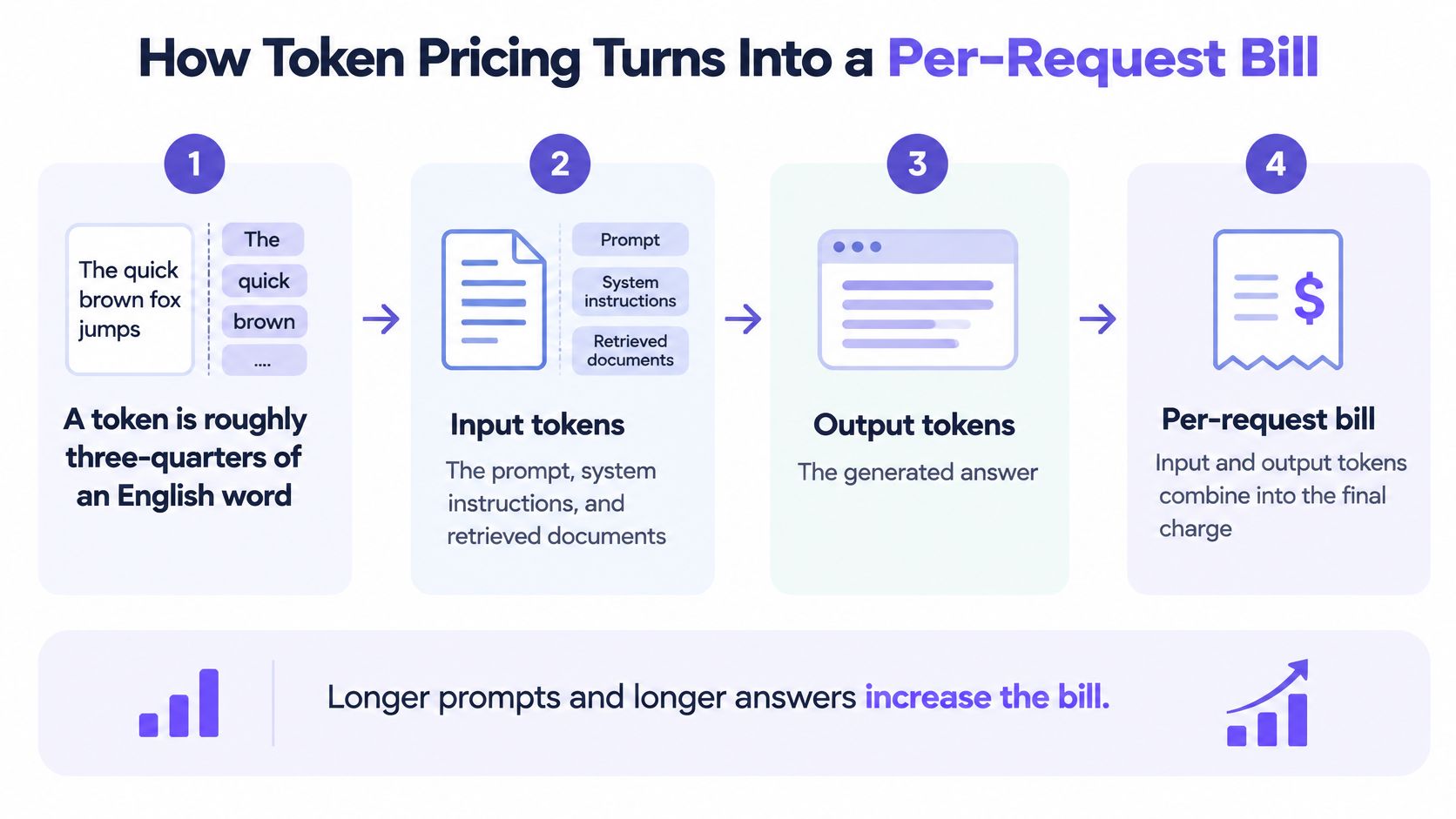
Request cost = (input tokens ÷ tokens per pricing unit × input rate) + (output tokens ÷ tokens per pricing unit × output rate).
For prices quoted per million tokens, use a million as the divisor. Input tokens include the prompt, system instructions, conversation history, and retrieved documents. Output tokens cover the generated answer. Use the model's tokenizer or returned usage fields rather than a word-count approximation, especially for code and multilingual text.
Separate rates matter. An arXiv analysis of API pricing reports that GPT-4 launched in March 2023 at $30 per million input tokens and $60 per million output tokens. Generation requires different computation from processing a prompt, so don't assume the two rates match.
Work a request through both rates
Consider a hypothetical request containing 2,000 input tokens and 800 output tokens. Claude Opus 5.5 costs $4.00 input and $20.00 output per million tokens at list price, compared with $2.03 input and $10.13 output on UberLLM.
| Component | At list price | Through our marketplace |
|---|---|---|
| Input calculation | 2,000 ÷ 1,000,000 × $4.00 | 2,000 ÷ 1,000,000 × $2.03 |
| Input cost | $0.008 | $0.00406 |
| Output calculation | 800 ÷ 1,000,000 × $20.00 | 800 ÷ 1,000,000 × $10.13 |
| Output cost | $0.016 | $0.008104 |
| Total | $0.024 | $0.012164, approximately $0.012 |
These calculations describe the hypothetical request, not an average for your application. At a hypothetical million requests per month with exactly that token mix, the difference is $11,836, or roughly $12,000. A different output length changes the result.
The billing flow makes the distinction between prompt size and answer size easier to inspect.
Build your estimate from actual requests
- Count input tokens using your prompt template and representative customer data. Include instructions and retrieved context.
- Estimate output tokens from accepted answers, not just the shortest successful demonstration.
- Apply each rate separately to its corresponding token count.
- Add the results to obtain the model charge for that request.
- Multiply by expected volume, keeping short and long request classes separate.
Our listed model price describes what a request typically costs, not a ceiling. A request is never billed above a max_price or max_cost sent with it. Keep that distinction explicit in your application: an estimate helps forecast spending, while a request ceiling enforces a limit.
Media Pricing for Images, Video and Audio
Sample per-unit media prices, list versus UberLLM
| Model | Billing unit | List price | UberLLM price |
|---|---|---|---|
| Flux 2 Pro image | Per image | $0.03 | $0.0075 |
| LTX 2.3 Fast Text to Video | Per job | $0.06 | $0.045 |
| Veo 3.1 Full Text-to-Video | Per job | $0.44 | $0.22 |
The Flux price is 75% lower, calculated from the listed image prices. LTX is 25% lower, and Veo is 50% lower. Each comparison applies only to the named model and matched setting, not to every image or video request.
Media products often bill in units other than text tokens. A generation job, image, audio duration, or video duration becomes the unit you need to normalize. Model choice and output settings determine what that unit buys.
Compare identical generation settings
A cheap short clip isn't a substitute for the longer, higher-resolution asset your product needs. Sound also matters: a silent preview and a finished audiovisual clip aren't equivalent deliverables.
Before comparing providers, pin down:
- Model and task: Keep the model version and generation mode identical, including text-to-video versus image-to-video.
- Resolution and duration: Record the requested dimensions and clip length rather than relying on a model's name.
- Audio setting: Specify whether generated sound is included.
- Job definition: Confirm what a job includes and whether extensions, upscaling, or additional outputs require separate requests.
The Veo API price-per-second guide helps frame duration-based comparisons. Don't convert a per-job quote into a per-second rate until you know the duration that quote covers.
A media price comparison is only useful when both prices buy the same deliverable.
For audio, distinguish generated speech from transcription and music generation. The duration of uploaded audio and the duration of generated output are different measurements, so record whichever one the service bills.
Keep a small settings manifest alongside your pricing spreadsheet: model identifier, task, dimensions, duration, audio, and any quality options. Price that manifest with each provider, then save the quote and configuration together. You can repeat the comparison when prices change without accidentally comparing a different product.
Why Cost per Completed Task Beats Cost per Token
The cheapest token rate can produce the most expensive finished task. A model that needs repeated correction, unnecessary tool calls, or manual repair may consume less expensive tokens while costing more to deliver a usable result.
The difference becomes visible when you compare a direct answer with a workflow that keeps taking actions.
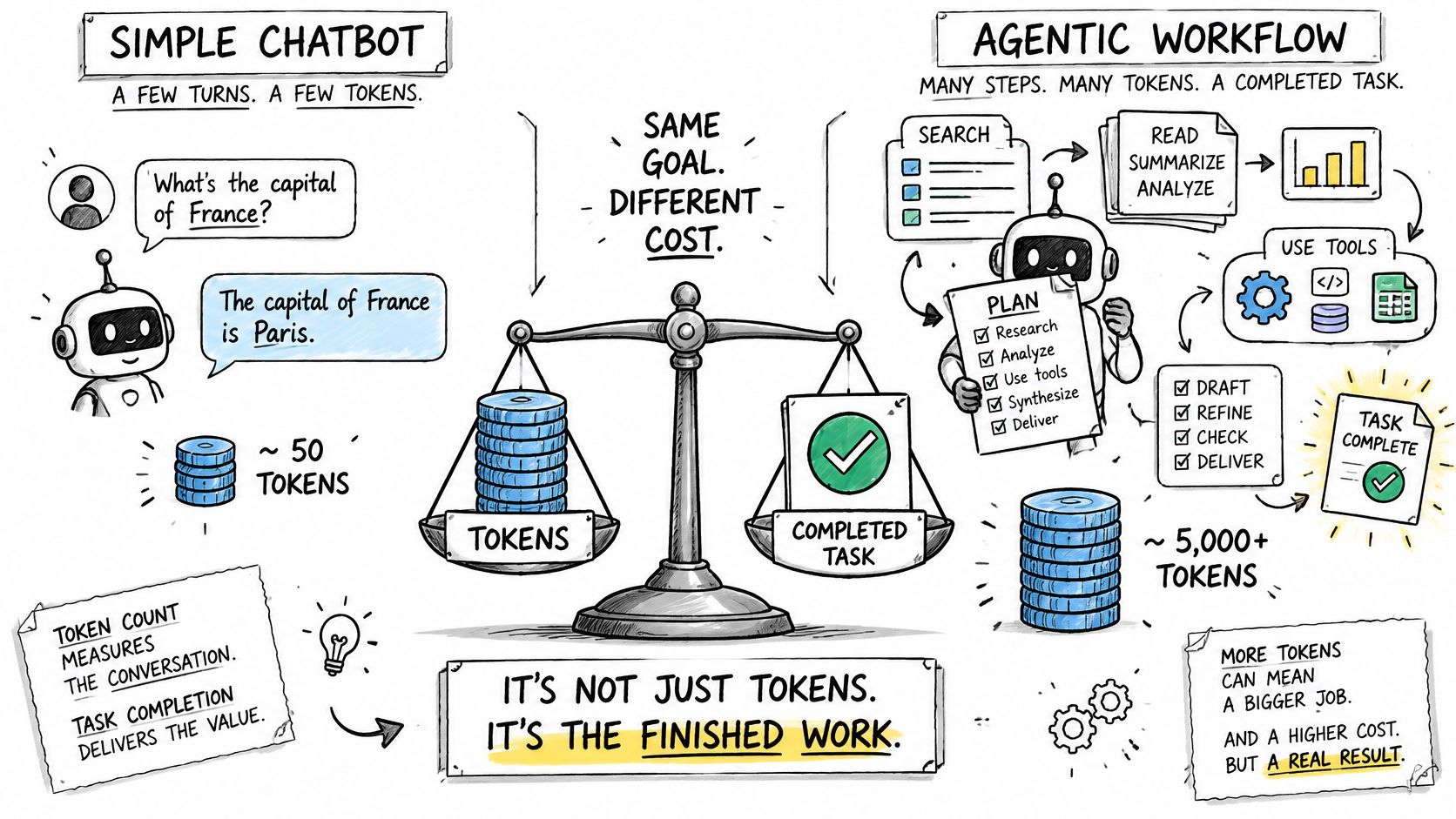
Oometa's agent-workflow cost analysis describes agentic workflows consuming 5–30 times more tokens than a conventional chatbot interaction and estimates roughly $0.001 for a simple chatbot call versus $0.10–$1.00 for a multi-step agent task. Treat those as context, not your forecast: planning, retrieval, tools, reflection, and retries differ by implementation.
Put unsuccessful work in the numerator
Cost per successful outcome = total task-related spend ÷ successfully completed tasks.
In a hypothetical batch, 1,000 attempts at $0.10 each cost $100. If 800 succeed, the cost per resolved task is $0.125, not $0.10. The unsuccessful attempts still belong in the cost calculation.
A second hypothetical comparison shows why sticker prices mislead:
| Hypothetical model | Cost per attempt | Success rate | Cost per success |
|---|---|---|---|
| Lower-priced model | $0.05 | 30% | About $0.167 |
| Higher-priced model | $0.10 | 90% | About $0.111 |
These are arithmetic examples, not measured model performance. They assume comparable attempts and an unchanged success rate; your evaluation must establish both.
The video provides another way to consider workflow costs.
Track output length, retries, latency-driven fallbacks, and charges for unsuccessful requests against a shared task identifier. Include tool or infrastructure costs when they're material, and distinguish an API response from a business success.
A support answer that requires an employee to rewrite it isn't equivalent to a resolved ticket. Use the outcome your customer needs: a resolved case, an accepted clip, or a coding task that passes its acceptance tests.
Why Model Prices Keep Falling
The cheapest model matching GPT-3.5-level performance on MMLU fell from approximately $20 per million tokens in November 2022 to $0.07 in October 2024, roughly 286 times cheaper, according to Orb's summary of Stanford-reported figures. Stanford's 2025 AI Index Report describes the capability-matched inference-cost decline over that period as more than 280-fold.
That comparison holds the benchmark threshold constant. It doesn't merely compare an expensive capable model with a cheaper weak model, although matching a benchmark still doesn't guarantee equivalent behavior on your application.
Budget for changing supply, not a permanent rate
Smaller architectures, quantization, improved inference software, specialized hardware, and provider competition contribute to lower costs. Each affects a different part of the economics: model size, numerical precision, serving efficiency, hardware utilization, or supplier margin.
For buyers, the practical implication is to separate a price assumption from a quality assumption. A lower rate is useful only if the candidate still meets your acceptance criteria.
- Maintain a dated price record: Save the model identifier, input and output rates, billing unit, and when you read them.
- Use budget scenarios: Model expected demand alongside a heavier workload with longer outputs and more involved tasks.
- Schedule reviews: Revisit rates quarterly, and investigate material invoice deviations before the next scheduled review.
A model price index can help identify candidates worth retesting. It shouldn't replace the price record attached to your own request logs.
Our listed price updates every 5 minutes. It uses the provider's list price multiplied by the share of list price charged during the marketplace's most expensive traded hour in the last 24 hours, and is never lower than the cheapest offer.
Check contractual price-change terms separately from your review schedule. A calendar reminder doesn't make a variable rate fixed, and historical declines aren't a guarantee that every route will become cheaper.
Choosing Between Credits, Subscriptions and Usage Billing
An arXiv study of AI-product pricing found subscriptions with usage quotas were the largest AI-native pricing pattern among 52 products; 25 offered a free tier, trial, or starter credits, while 13 used pay-as-you-go entry pricing. That pattern doesn't establish a universal winner. It shows why pure consumption billing isn't the only sensible structure.
The decision is about who carries the risk of variable usage. A subscription moves some demand risk toward the vendor, while prepaid and metered structures make consumption more visible to the buyer.
Use your operating constraints to choose
| Question | What the answer suggests |
|---|---|
| Is monthly usage stable? | A subscription with a usable quota may simplify budgeting |
| Will you use several providers or modalities? | A shared prepaid balance can reduce fragmented funding |
| Can you forecast consumption reliably? | Metering is easier to manage when workload estimates are dependable |
| Does finance require a hard cap? | Prioritize enforceable limits over billing labels |
Stable usage with a single provider points toward a subscription, provided the allowance fits your actual workload. Don't count unused quota as value, and verify whether overages require approval or happen automatically.
Uneven demand across several models points toward credits or metered usage. Expiry and rollover terms matter because buying capacity you never use can erase an apparent discount.
Separate funding from charging
A prepaid wallet describes when you fund usage, not necessarily how each request is priced. Likewise, pay-as-you-go can operate through a prepaid balance rather than a postpaid invoice.
We have no monthly fee and no minimum. Customers keep one balance and pay as they go. Our upto payment option, offered first, has the wallet sign a quote as a ceiling; after the answer, only the actual cost is taken, rounded up to the next millionth of a dollar.
Choose the constraint you can't compromise on before choosing the plan.
If that constraint is a fixed budget, inspect spending controls. If it's predictable access for a steady team, inspect the quota and overage rules. If it's flexibility across text and media, check whether the same balance supports the workflows you intend to run.
Provider Checklist Beyond the Listed Price
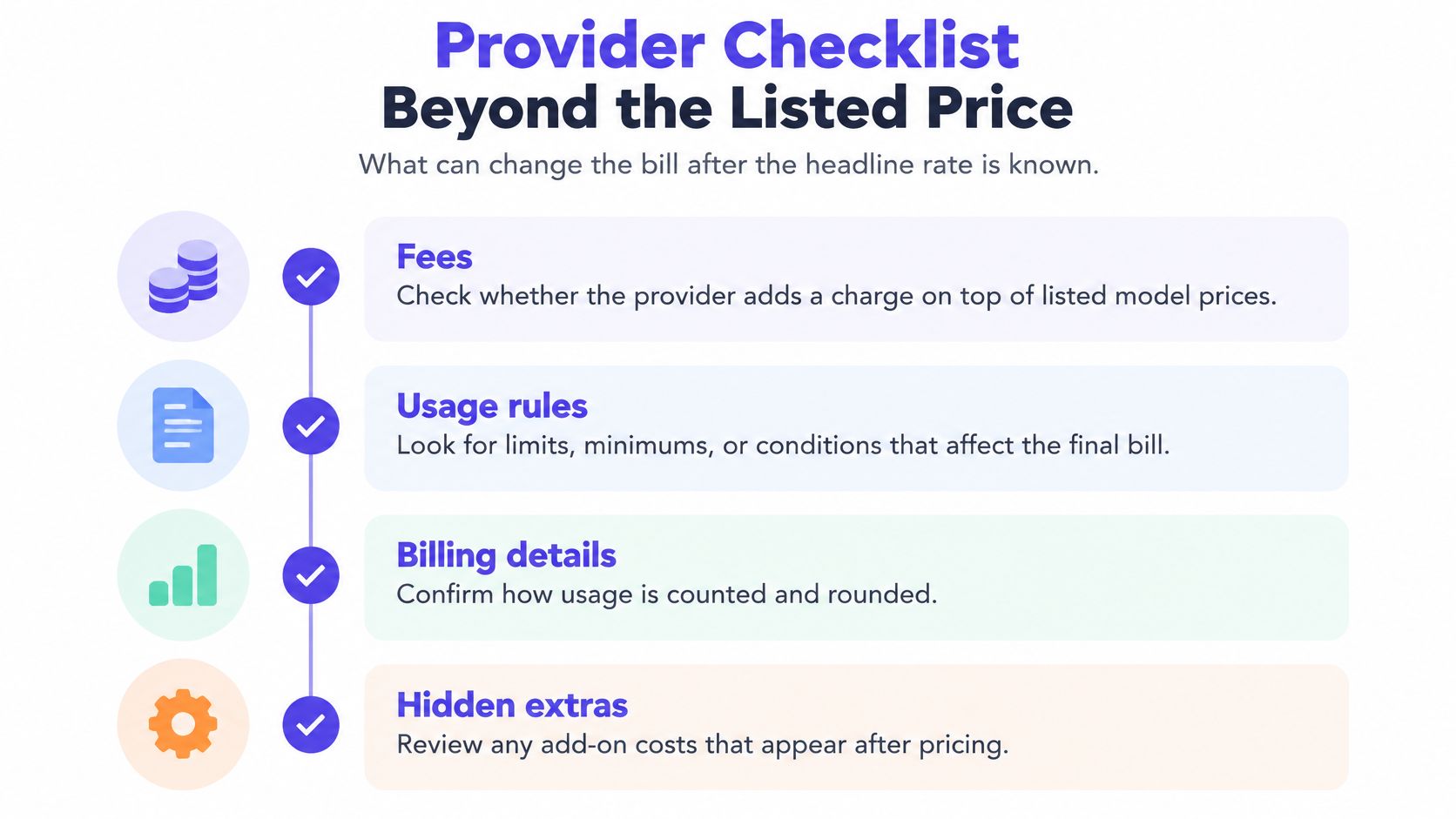
A rate card doesn't tell you everything needed to reconcile a production bill. Test the billing behavior, not just the arithmetic displayed in a playground.
Use this checklist to identify the terms that need a concrete answer.
Verify the charge path
- Fees are explicit. We add no fee on top of listed model prices. Keep funding charges separate from request charges when comparing total spend. A bad answer is a quote that excludes an unspecified platform surcharge.
- The charge basis is traceable. When the provider reports what it charged for a call, we bill exactly that amount. Otherwise, the call costs its tokens at the listed price. A bad answer is an invoice total that can't be tied to request-level usage or reported charges.
- Unsuccessful requests have defined treatment. Our failed requests and generations cost nothing. A completed generation that you dislike, however, shouldn't automatically be classified as a technical failure. A bad answer leaves the distinction undefined.
Verify the control path
- Keys provide isolation. Our API keys are scoped and revocable, and per-key spend limits apply. An MCP tool call is billed, limited, and refused like the equivalent API request. A bad answer requires disabling every service to stop a single compromised integration.
- Fallback behavior is understandable. We move requests to another healthy seller when a provider becomes slow or unavailable. Test the resulting charge and timing in your logs. A provider that can't explain whether an alternate route changes the charge leaves you with an unknown price.
For mixed workloads, inspect how a unified text, image, and video API exposes task status and results. An asynchronous media request needs a durable task identifier so submission, completion, and billing can be reconciled even when they happen at different times.
Run these checks against representative production-shaped traffic, including timeouts, cancellations, and failed jobs. A demo account with short prompts and successful responses won't reveal whether your accounting survives the conditions your application must handle.
Confirm Your Cost per Task Before You Commit
Use a bounded evaluation rather than migrating on the strength of a pricing table. The purpose is to discover which option delivers acceptable results at an acceptable operating cost, without changing the workload.
Run a controlled comparison
- Select representative tasks. Include routine requests, difficult cases, long context, and inputs that previously caused trouble. Keep sensitive customer material out of an evaluation unless its use is authorized.
- Capture the execution record. Log input and output tokens, task identifiers, retries, tool calls, charges, and success judgments. Record time to a usable result, not just time to the first response.
- Calculate the current baseline. Divide all relevant spend by accepted outcomes. Keep task classes separate so easy requests don't conceal poor economics on difficult work.
- Test alternative models. Preserve prompts, inputs, tool permissions, and acceptance tests. With our common API access, switching models uses a different model identifier, and each request routes to the cheapest healthy seller.
- Apply a request budget. Choose limits appropriate to each task class, and verify how the application handles refusal or incomplete work. A limit should produce a controlled user experience, not an unexplained error.
- Compare operational results together. Evaluate cost per success, latency, and failure rate. Inspect actual outputs where automated scoring can miss factual errors or incomplete work.
- Pilot before committing. Send a small, controlled share of live traffic to the candidate. Reconcile billed charges against your logs during the pilot, and keep a rollback path until both quality and accounting are dependable.
Make the decision repeatable
Write down the acceptance criteria before reviewing model names and prices. Otherwise, it's easy to excuse weaker output because a candidate looks cheaper.
Keep the evaluation set versioned, and add new failure cases as the application changes. Schedule the next review quarterly, with an earlier retest when a material model, pricing, or product change makes the existing comparison unreliable.
The winning option isn't the cheapest model in isolation. It's the configuration that completes your workload within your quality, latency, and budget constraints.
UberLLM offers one API key for text and media models, a shared prepaid balance, and routing to the cheapest healthy seller for each requested model. Visit UberLLM to compare current prices, then test representative tasks and measure the cost of accepted results before moving production traffic.