Photo Editing API Guide: Features, Formats and Workflows
A practical guide to photo editing API features, formats, async jobs, retries, and provenance so you can integrate with confidence.
Your team has a working demo. A user uploads a product photo, your app removes the background, and the result looks good. Then real traffic arrives, with oversized phone photos, transparent logos that turn white, duplicate submissions, and a batch that stalls halfway through. That's where a demo becomes a production problem.
Choosing a photo editing API isn't just about which edits look best in a sample gallery. It's about how uploads are checked, how slow jobs are tracked, which format comes back, and what you'll pay when jobs fail and retry. This guide walks through those decisions in order, so you can test a provider against your own images before you commit.
Table of Contents
- What a Photo Editing API Covers and Who Uses It
- Photo Editing Operations at a Glance
- Validating Uploads Before They Reach the Editor
- How Edit Requests Move from Upload to Result
- Choosing Output Formats and Preserving Transparency
- Building for Slow Edits, Retries and Outages
- Provenance, Metadata and Data Retention Controls
- Evaluating Photo Editing API Providers
- Confirm Your Shortlist and Start Integrating
What a Photo Editing API Covers and Who Uses It
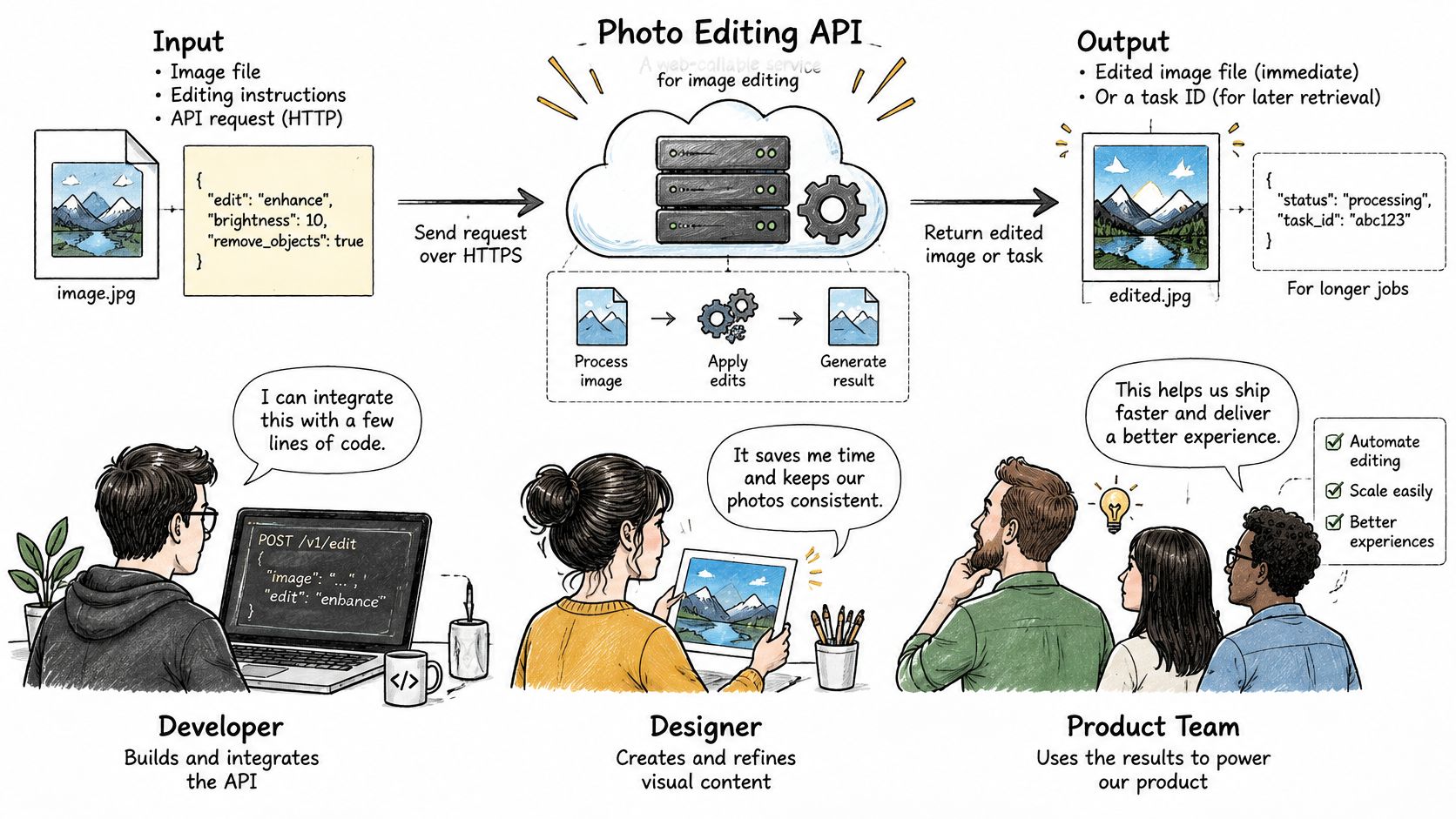
A photo editing API is a web-callable service that accepts an image plus instructions, runs the edit on a server, and returns the edited file or a task your app collects the result from later. You never ship a desktop editor, and your users never install one. Your application sends a request, the service does the work, and your code decides what happens to the output.
That model grew out of desktop tools moving to the cloud. Adobe's Photoshop and Lightroom APIs support layer-level and document-level edits and can generate thousands of variations in minutes. The demand behind tools like these is easy to explain: creative teams spend a large share of their working hours on repetitive tasks such as resizing assets, and an API takes exactly that work off their plates.
Most operations fall into two families. Deterministic transforms, such as resize, crop, rotate, and color correction, behave like a photocopier setting: the same input always produces the same output, so you can cache results and test against fixed expectations. AI-driven edits, such as background removal, masking, inpainting, and upscaling, behave more like a retoucher: the result depends on the model and the image, so quality can vary across image types and even across runs of the same request. That difference shapes your budget. A deterministic call either works or fails, while a model-based edit can return a plausible-looking file that still gets rejected downstream. A cheap per-call price grows quickly once retries enter the picture.
Who Relies on These APIs
- E-commerce teams generating product photo variants for listings and ads
- Marketplaces removing backgrounds or normalizing seller uploads to consistent dimensions
- Advertising teams producing many sizes of one creative from a template
- Media apps embedding editing features inside their own products
- Developers wiring image edits into AI coding tools and content agents
Every team on that list pushes real user uploads through someone else's servers, so upload validation, job reliability, and file provenance belong in the buying decision from day one.
Photo Editing Operations at a Glance
Start by matching your product to the operations below. Read the input column carefully, because it tells you what extra work your app must do before the call.
| Operation | What It Does | Typical Input | Typical Output |
|---|---|---|---|
| Background removal | Isolates the subject and removes the background | Single image, optional mask | PNG with alpha channel |
| Resize and crop | Changes dimensions to target sizes or aspect ratios | Image plus width, height, or ratio | JPEG, PNG, or WebP at set dimensions |
| Format conversion | Re-encodes the file into another format | Source image plus target format | Re-encoded file, metadata may change |
| Color and lighting adjustment | Corrects exposure, white balance, and contrast | Image plus adjustment parameters | Adjusted image at the same dimensions |
| Masking | Generates a selection mask for a region | Image plus prompt or point | Grayscale mask image |
| Inpainting and generative fill | Replaces or adds content inside a masked area | Image, mask, and text prompt | Edited image, output varies by run |
| Upscaling | Increases resolution and adds detail | Image plus scale factor | Larger image, time and size scale with output |
| Templated composite | Places a subject into a layout or brand template | Subject image, template ID, and text fields | Rendered composite image |
How to Read the Table
Deterministic rows, such as resize, crop, and format conversion, are the easiest to ship. You can write a test that sends one image, checks the output dimensions and format, and expects the same result next week. You can also cache outputs safely, because identical inputs won't produce a different file.
Generative rows work differently. Inpainting needs a mask that marks the area to replace, plus a prompt describing what should appear there. If your app doesn't already create masks, you'll need a masking step first, either from a user drawing on the image, a point click, or a separate segmentation call. That's an extra request, an extra failure point, and extra UI.
Say you're building a feature described in this guide to changing a landscape photo to portrait. A simple crop is deterministic, but extending the canvas and filling the new space is generative. Those two approaches need different testing, different timing, and often different pricing, even though the user sees one button.
Practical rule: If an operation needs a mask or a prompt, budget for human review or a retry button. The first result won't always be the one your user keeps.
Before you evaluate any provider, write down the operations your product needs. Mark which ones need masks, which ones need prompts, and which ones must preserve transparency. That short list becomes your test plan later, and it stops you from paying for a broad feature set you'll never call.
Validating Uploads Before They Reach the Editor
Every uploaded file is untrusted binary input, whatever its filename or Content-Type header claims. A client can label any file as image/png, so your ingestion layer has to check the file itself before an editor, a model, or another user ever sees it. The OWASP File Upload Cheat Sheet recommends validating magic bytes and decoding the file with a maintained image library, and rejecting images above a maximum pixel dimension because highly compressed files can expand into extreme memory allocations during decoding.
Controls to Apply in Order
- Check the actual bytes. Validate magic bytes, then decode the file fully. If your library can't decode it, reject it, even if the header looks right.
- Rename on the server. Generate a server-side UUID for storage and ignore the supplied filename, which can carry path tricks or collisions.
- Restrict types and byte size. Accept only the extensions and formats your editor supports, and reject files above a clear size limit.
- Cap pixels and decoded memory. A small compressed file can decode into a huge bitmap, so limit width, height, total megapixels, and estimated memory, not just bytes.
- Enforce authorization on fetch. Check that the requester may access that specific image every time it's downloaded or edited.
- Keep originals out of the web root. Store them in private storage or serve them through an application-controlled handler, so a guessed URL doesn't expose them.
After a file passes, normalize it by re-encoding into a controlled format before downstream transforms. Re-encoding reduces parser ambiguity between libraries and strips active or unexpected payload content while keeping the image data you need. It also gives every later step a known starting point for color mode and orientation.
Your API contract matters as much as the checks. Return structured validation errors with a machine-readable code, the field that failed, and a message your client can show. A user who uploads a corrupt HEIC file should learn that the file failed decoding, not that the server returned a generic error. When you build against a provider, check its documented limits first, as in the media API documentation, and mirror the strictest limits at your own edge so bad files fail fast and cheaply.
How Edit Requests Move from Upload to Result
Some edits return in the same HTTP response. Others return a task you track until the result is ready. Mixing those two patterns up is a common source of timeouts, so route by expected duration first.
| Edit Type | Typical Duration | Recommended Mode | Timeout Risk |
|---|---|---|---|
| Resize, crop, and format conversion | Usually short | Synchronous | Low |
| Color and lighting adjustment | Usually short, grows with image size | Synchronous for small images | Low to moderate |
| Background removal | Grows with image size and load | Synchronous for single images, asynchronous for batches | Moderate |
| Generative edits (inpainting, generative fill) | 5 to 15 seconds | Asynchronous with polling or webhook | High if held on an open request |
| Upscaling and other heavy jobs | Can exceed generative edits | Asynchronous | High |
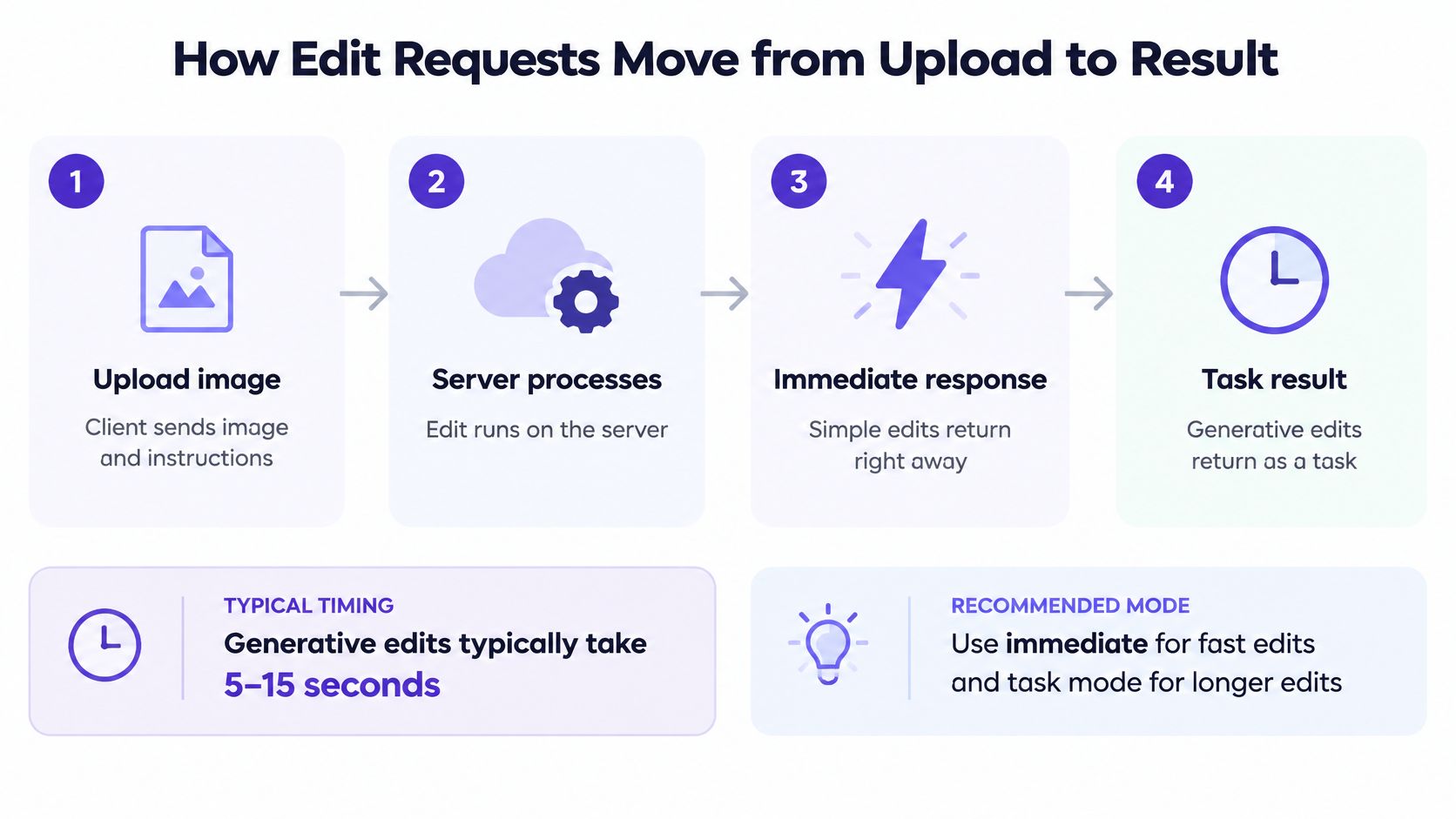
The Six Steps in a Request Lifecycle
- Authenticate with a scoped API key. Give each service its own key so you can revoke one without breaking everything else.
- Submit the image and parameters. Send the source file or its URL, the operation, dimensions or prompt, and your requested output format.
- Receive a result or a task ID. A task record should include an ID, a status that moves from queued to processing to completed or failed, an expiry time for the output, and a download reference.
- Poll or wait for a webhook. Poll with increasing intervals, or register a webhook so the provider notifies you. On our platform, text responses stream back token by token, and image and video jobs return a task that you poll or that a webhook reports as ready.
- Download the output promptly. Treat the download as its own step with its own timeout, because result links expire.
- Store your own copy. Save the file with its job ID, input reference, parameters, and output metadata, so you can trace or reproduce the edit later.
Log the task ID, status changes, timestamps, and error codes at each step. When a user reports a missing result, those logs tell you whether the job never left the queue, failed during processing, or completed but expired before download. Without them, you're guessing.
Keep fast operations synchronous, route anything that could exceed your timeout budget through tasks, and never assume a completed task means you already have the file.
A useful mental model is a restaurant ticket. Submitting the order isn't the meal, the ticket number lets you claim it, and the kitchen won't hold it forever. Build your client around the ticket, not around waiting at the counter with the connection open.
Choosing Output Formats and Preserving Transparency
Format choice decides file size, transparency, and whether the next system can open the result at all. Compare the four common delivery formats before you hard-code one.
| Format | Transparency | Animation | Strengths | Watch For |
|---|---|---|---|---|
| JPEG | No alpha channel | No | Small files for photographs, universal support | Lossy, so repeated saves degrade the image |
| PNG | Full alpha channel | No | Lossless, sharp edges and graphics | Large files for photographs |
| WebP | Yes, lossy or lossless | Yes | Broad web support, up to 16,383 × 16,383 px | Confirm client support for the target |
| AVIF | Yes | Yes | Better compression and higher color depth | Browser support and progressive rendering differ |
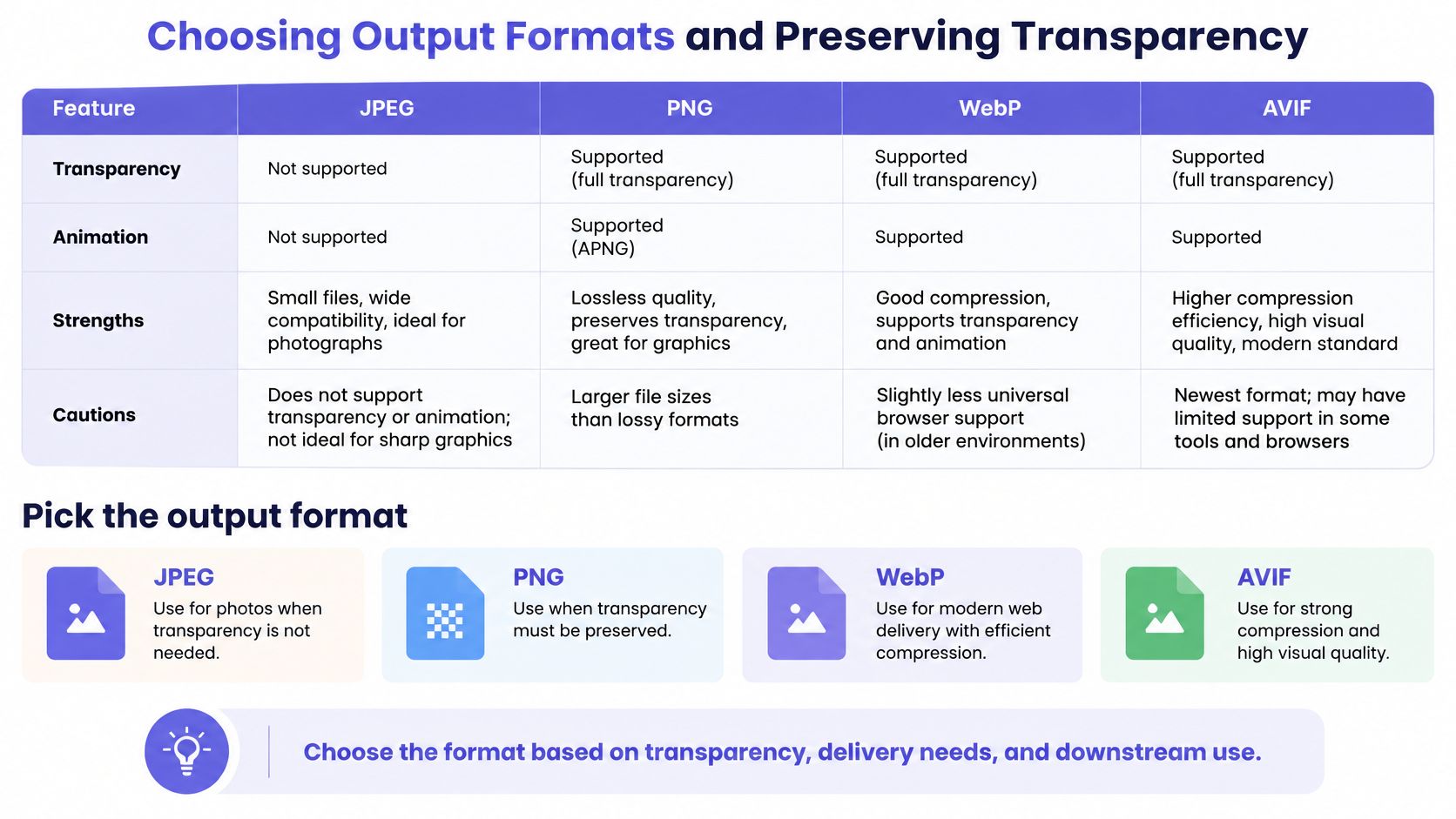
Negotiate format instead of fixing it globally. The MDN guide to image file types identifies image/webp as broadly supported for still and animated images with transparency in lossy or lossless modes, with dimensions up to 16,383 × 16,383 pixels. AVIF can compress better and supports higher color depths, but support and rendering behavior differ by client, so don't convert every asset to AVIF.
A Working Pattern for Intermediates and Delivery
Keep a lossless or high-quality intermediate while edits are still in progress. If a user removes a background, then resizes, then adds a shadow, saving a lossy JPEG between each step compounds compression artifacts. Work from the intermediate, then encode once at delivery, typically WebP for broad web use and AVIF only where the consuming client explicitly supports it.
Ask what the response reports back. A solid photo editing API returns requested format, actual format, dimensions, color profile handling, alpha preservation, frame count, and byte size. If the actual format differs from what you requested, your code should know immediately, not when a customer complains.
Verify transparency after each transform. Say a marketplace seller uploads a logo with a transparent background, and your pipeline resizes and composites it onto a white card. Resize and compositing can change color mode or drop alpha, so check that the output still has an alpha channel when you requested one, and that it doesn't carry one when you flattened it on purpose. That one assertion in your test suite prevents a whole class of visible bugs.
Building for Slow Edits, Retries and Outages
Production failures rarely look like a clean error. They look like a request that times out after the edit ran, a webhook that arrives twice, or a batch that stops at item 340 of 500. The SnapEdit guide to adding AI photo editing to an app notes that generative edits can take 5 to 15 seconds while many deployment environments impose roughly 60-second upstream timeouts, and that nominal rate limits commonly sit at 60 to 120 requests per minute. Those numbers say little about queue behavior, so you need controls of your own.
Six Controls That Prevent Expensive Failures
- Idempotency keys. Send a unique key with each job so a resubmitted request returns the original task instead of running and charging twice.
- Retries only on transient errors. Retry 429 and 503 responses with exponential backoff and jitter, honoring Retry-After. Never retry a validation error, because the same input will fail the same way.
- Polling backoff. Lengthen the interval between status checks as a job ages, so thousands of clients don't turn status polling into its own load spike.
- Webhook verification and deduplication. Verify signatures, store delivery IDs, and handle repeats or out-of-order events, because a completed event can arrive more than once.
- Batch checkpoints. Record which items completed, with their output references, so a restart resumes from the checkpoint instead of rerunning finished work.
- Failover with logging. If requests can move to another healthy provider, log each failover with the job ID and reason, so you can audit quality and cost afterward.
Test bursts at your real concurrency, not one polite request at a time. Send your expected peak, watch how the queue drains, and check whether small jobs wait behind large ones. Fair scheduling matters when one customer uploads a huge batch while another waits for a single avatar edit.
A Reliability Scorecard to Keep
- p95 and p99 latency by image size and operation, not just averages
- Share of synchronous versus asynchronous calls and their timeout rates
- Task expiry window and how many results expired before download
- Retry rate and duplicate-job count per day
- Manual recovery time your team spends each week on stuck jobs
Cost test: Divide total spend, including retries and failed work, by completed usable edits. That's the price you're actually paying.
A low per-call price can lose once you count duplicate runs, timed-out jobs you resubmit, and engineer time spent restarting batches. Compare providers on cost per completed edit, and you'll often find the more reliable service is the cheaper one in practice.
Provenance, Metadata and Data Retention Controls
People use the word provenance for five different things, and each one survives editing differently. EXIF metadata carries camera and edit fields inside the file. C2PA Content Credentials record a signed edit history. Invisible watermarks hide a signal in the pixels. Application audit logs are records your own system writes. Provider job records capture model, parameters, and timestamps on the vendor side.
| Layer | After resize | After compression | After format conversion |
|---|---|---|---|
| EXIF metadata | Often removed on re-encode | Often removed on re-encode | Often removed or changed |
| C2PA Content Credentials | Can be stripped | Can be stripped | Can be stripped by ordinary conversion |
| Invisible watermark | May survive; weakens after heavy crop | Weakens under heavy compression | May survive some conversions |
| Application audit log | Unchanged | Unchanged | Unchanged |
| Provider job records | Kept per provider terms | Kept per provider terms | Kept per provider terms |
The practical lesson is that file-based markers are fragile. Ordinary platform processing, re-encoding, or a screenshot can remove metadata and credentials, and heavy cropping or compression can make a watermark undetectable. Your own audit log is the layer you control end to end, so write it at edit time with input and output hashes, parameters, model identifiers, and timestamps.
Don't oversell what a marker proves. Provenance shows origin and history, not that an image is authentic, licensed for your use, or accurate in the context where you publish it. A credentialed photo can still mislead if it's cropped or captioned misleadingly.
Questions to Send Any Vendor
- Retention. Are source images retained, for how long, and in which regions?
- Training use. Are uploaded or edited images used to train models?
- Deletion. How are deletion requests honored, how quickly, and how is completion confirmed?
- Sub-processors. Which other companies handle the data during processing?
- Reconstruction. Do logs capture enough to rebuild who edited what, when, and with which settings?
Expect obligations on your side too. The Google Photos API policy, for example, requires applications to disclose data access and sharing, obtain affirmative consent, protect data, limit permissions, and honor deletion requests. If you work in journalism, advertising, insurance, or marketplaces, get answers in writing before launch, because retrofitting deletion and data-location controls after users upload images is painful.
Evaluating Photo Editing API Providers
Two providers can quote the same per-image price and still cost very different amounts once failures and retries are counted. Score candidates against your own workload, grouping criteria so strength in one area cannot hide a weakness in another.
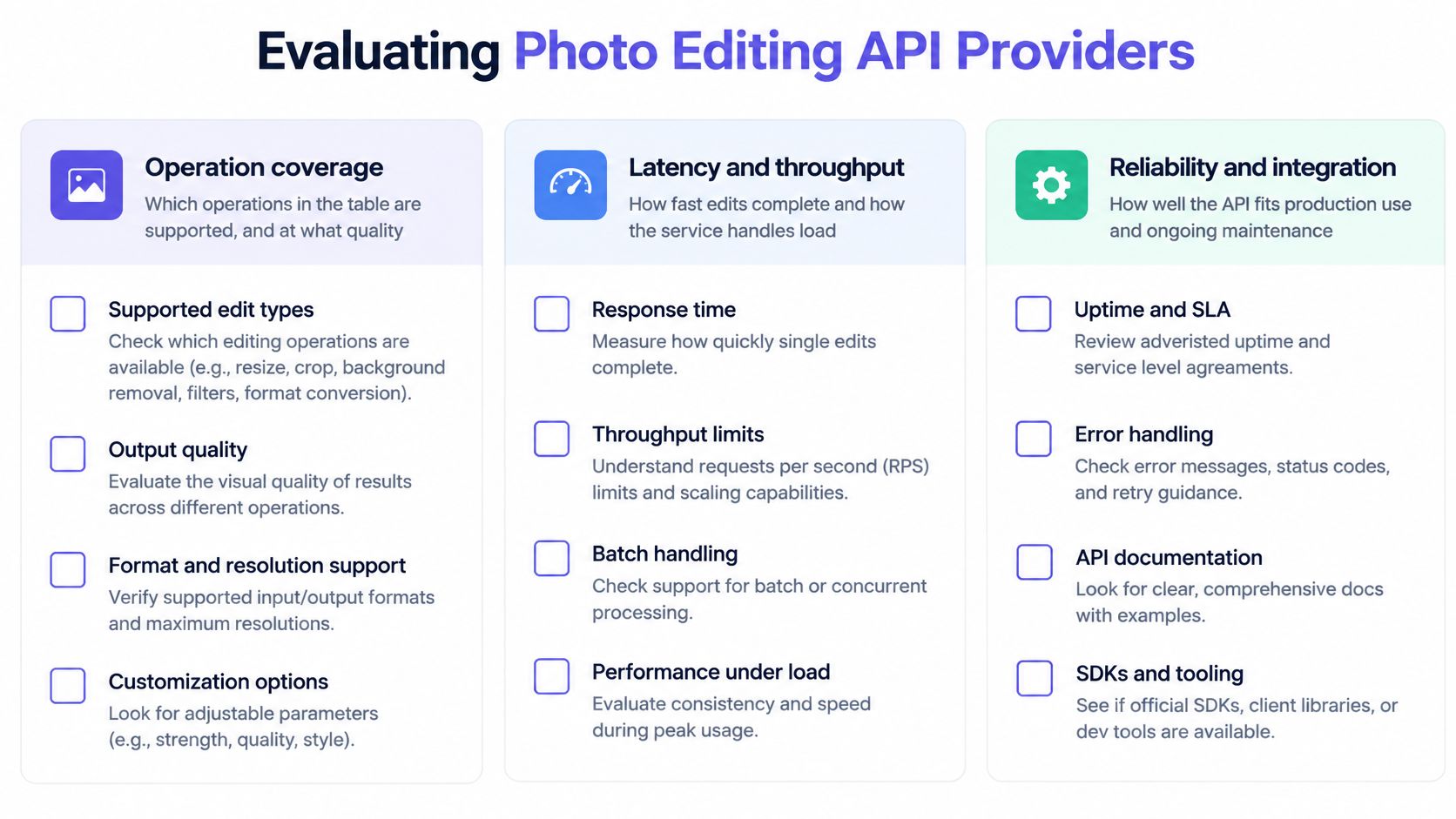
The Criteria Checklist
- Operation coverage. Which operations are supported, and does AI quality hold up across small and large images?
- Execution model. What are the synchronous limits, task expiry windows, and polling or webhook options? Expiry is easy to underestimate: UberLLM keeps image result links for about 15 minutes, so fetch results promptly.
- Throughput. What requests-per-minute limits apply, can you set per-key ceilings, and how does the queue behave under bursts?
- Output control. Can you negotiate format, and does the response report alpha, color profile, and actual dimensions?
- Reliability. Are idempotency keys, retry guidance, and failover documented and testable? Ask whether a request is rerouted automatically when a provider slows or goes offline.
- Pricing. Is billing per image, per job, or per megapixel? Check whether failed jobs are charged, what fees apply when you add prepaid credit, and whether per-key spending limits exist.
- Compatibility. Do SDKs fit your stack, and can existing client code keep its shape while changing endpoint and key?
- Data terms. What are the retention, training, deletion, and data-location commitments?
Run a Test You Can Compare
- Pick 50 representative images from your own catalogue, including awkward edges, low light, transparency, and large files.
- Run the same operations through each shortlisted API with identical parameters. For editing models, include the prompt and mask cases your product will send, and confirm the accepted parameters on each model's listing page, such as an image editing model listing.
- Record p95 latency, failure rate, and output quality per operation, with a simple pass or fail judgment from someone who knows your product.
- Convert every price to one unit, cost per successful output including retries, so a cheap rate that still bills failed jobs stops looking cheap.
- Rank by cost per completed edit among providers that pass your quality bar, because list price alone misses what failures cost.
A provider that wins on clean sample photos can still lose on your messy real ones. Your 50 images are the closest thing to ground truth you will get before launch.
Confirm Your Shortlist and Start Integrating
Turn your evaluation into a short decision sequence. Score each candidate against your operations list, your upload validation rules, your timing routing, your format requirements, your reliability scorecard, your provenance questions, and your provider criteria. Drop any provider that fails a requirement you can't work around, even if its demo output looks strong.
Keep only providers that pass your 50-image test on p95 latency, failure rate, and cost per successful output. Then rerun that same test at your real concurrency, including a burst, because queue behavior under load is where otherwise good services disappoint. If quality or latency collapses at peak, you want to learn that in staging.
Check integration effort. If your code already uses OpenAI- or Anthropic-compatible SDKs, prefer a candidate that lets you keep that code and change only the endpoint and key. With UberLLM, one API key works with OpenAI- and Anthropic-compatible requests, which reduces the amount of client code you rewrite when you switch models.
Safeguards to Set Before Launch
- One scoped, revocable key per service. Our API keys are scoped and revocable, and requests are encrypted in transit, so a leaked key can be cut off without rotating everything.
- A per-key spending limit. Anything sent with an API key is billed to the account, and a per-key spending limit can be set, so a runaway retry loop can't drain your balance overnight.
- Alerts on retry rate and duplicate jobs. Rising retries usually appear before users start reporting failures.
Prove those safeguards work. Run a staging batch designed to fail partway through, with invalid files, oversized images, and simulated timeouts mixed in. Confirm that checkpoints resume correctly, idempotency keys prevent double runs, webhooks dedupe, and alerts fire. Once that batch behaves, you're ready for real traffic, with your operations, validation, timing, formats, reliability, provenance, and provider checks all tied to evidence from your own images.
If you're ready to test a photo editing API against your own catalogue, UberLLM gives you image editing and generation models through one OpenAI- and Anthropic-compatible endpoint, with asynchronous tasks, polling, and webhooks for longer jobs. Create a scoped key, set a per-key spending limit, and run your 50-image test to compare cost per completed edit before you commit to production traffic.