Hoe kies en integreer je een Image Generation API
Vergelijk Image Generation API-mogelijkheden, aanvraagvelden, asynchrone resultaten, modeltests, foutafhandeling en facturering, met stappen voor productie-integratie.
Dit artikel is nog niet vertaald en wordt daarom in het Engels getoond.
More than 15 billion images had been created with text-to-image algorithms by August 2023, an average of roughly 34 million a day since DALL-E 2 launched, according to an Everypixel analysis of AI image statistics. The same analysis attributes about 12.6 billion of them, roughly 80%, to Stable Diffusion based models, services and applications.
At that volume, image generation stops being a creative demo and becomes infrastructure. The questions that decide whether a product ships stop being about which model paints prettier pictures and start being about request contracts, job states, timeout behavior, and whether a failed generation still lands on your invoice.
This is a builder's guide to the image generation API layer. It covers how requests are shaped, how tasks move through a lifecycle, how to test a model instead of trusting a leaderboard, and where costs hide. Price per image is the easiest number to compare and the least useful one on its own.
Table of Contents
- Image Generation API Capabilities at a Glance
- Request Patterns and Response Fields
- Async Jobs, Task States and Result Retrieval
- Model Selection Criteria and How to Test Them
- Checking Edit Fidelity and Provenance Before Launch
- Latency, Errors and Retry Behavior in Production
- How to Integrate an Image API Step by Step
- Billing Units and How to Compare Real Costs
- Run a Test Call Before Choosing Your Model
Image Generation API Capabilities at a Glance
| Capability | Input | Output | Retrieval pattern |
|---|---|---|---|
| Text generation | messages and parameters | streamed text | streaming response |
| Text to image | prompt, size, model identifier | one or more images | task, polled or webhook |
| Image editing | source image, instruction, optional mask where supported | edited image | task, polled or webhook |
| Text to video | prompt, duration, resolution | video file | task, polled or webhook |
| Image to video | source image, prompt, duration | video file | task, polled or webhook |
| Music generation | prompt, style, duration | audio file | task, polled or webhook |
| Speech synthesis | text, voice | audio file | streamed audio or a returned file |
One endpoint and one key can cover several model families at once, because the model identifier is what selects the family and the version. That convenience has a sharp edge. Each family accepts a different parameter set, so a body that validates for one model can fail on another, and sizes, masks, seed support and multi-output limits all differ between them.
An image generation API is a hosted inference service with three parts: a request contract that turns a prompt and settings into a signed call, a result object that carries the image plus its metadata, and a job lifecycle for work that outlives a single HTTP response. Each part needs its own design decisions, and each fails differently.
The pattern is younger than it looks. The public release of Stable Diffusion on August 22, 2022 established the serving shape most providers still use, as TechCrunch reported at launch: an application posts a prompt and parameters, the provider runs the GPU work, and an image or a task comes back. That model ran on high-end consumer hardware and produced 512×512-pixel images in a few seconds, trained on LAION-5B, a dataset of roughly 5.85 billion image-text pairs with an aesthetics-filtered subset of about 600 million. Stability AI claimed more than 15,000 testers were generating around 2 million images a day during early public access, which is the clearest early signal that hosted access, not desktop software, was the shape of demand.
The sections ahead follow the order a real integration meets these problems: request fields and response objects first, then async task states, model selection tests, edit fidelity and provenance, latency and retries, step-by-step integration, billing units, and a final test call. Teams wiring generations into an automated pipeline usually want the whole loop demonstrated once, and this walkthrough of an image API for automation workflows shows the full cycle from trigger to stored asset.
Request Patterns and Response Fields
Most first integrations break in the request body, and rarely because of the prompt. Build the fields in the order they go on the wire and the debugging gets shorter.
- Model identifier. Send it first in your own thinking, because it decides which of the remaining fields are legal. A negative prompt or a mask that one model accepts will be rejected by the next.
- Prompt and negative prompt. The negative prompt is a supported field on some families and ignored on others, so verify rather than assume.
- Size or aspect ratio. Express it the way the model expects, in pixels or in named ratios. Validate it locally before inference, because a rejected call costs a round trip while a generation that fails late costs a timeout and a queue slot.
- Output count. Multiple outputs per call look efficient until you notice that billing usually scales with the count, not the call.
- Output format. PNG, JPEG or WebP changes your downstream conversion work as much as your byte count.
- Seed. Include it whenever reproducibility matters. Without it, "run that again" means "roll the dice again."
- Webhook URL. Long jobs finish after your request has returned, and a callback is cheaper than a tight polling loop.
- Idempotency key. Generation is expensive, so a retried create without a key becomes a second billed job and a duplicate image.
Validate before you spend. Check the aspect ratio, the model identifier and the required fields in your own code first. A local schema check catches the class of error that otherwise surfaces as a 400 after a queue wait, and it keeps malformed traffic off a metered endpoint entirely.
The response side is where teams lose assets they've already paid for. OpenAI's image API reference shows the shape most providers converge on, an image object with a base64 payload, a hosted URL and, where supported, a revised prompt. Normalize whatever the provider returns into your own stable schema, and keep a raw provider metadata block for controls your schema doesn't model yet.
| Field | What it holds | Production note |
|---|---|---|
| Asset URL | link to the generated file | short-lived and access-controlled, so download before it expires |
| b64_json | base64-encoded image bytes | fine for small synchronous responses, heavy on memory for large payloads |
| revised_prompt | the prompt as the model reworded it | store it, because it explains outputs you didn't expect |
| Model identifier | the model and version that produced the output | required for audit and reproduction |
| Dimensions and format | width, height and MIME type | confirm against the requested aspect ratio |
| Checksum | integrity hash of the file | verify after download and after any format conversion |
Treat base64 as a transport detail, not a storage strategy. An encoded image inflates the payload by roughly a third and sits in memory while your app parses JSON. For production media, write the decoded bytes to object storage and hand your front end a signed retrieval URL instead. Add the MIME type and a checksum to the record while you're there, so a corrupted download is caught by your pipeline rather than by a user.
The rule I'd enforce in code review: every stored asset carries the model identifier, the seed, the effective prompt and the request timestamp in its metadata. Without those four, a support ticket about "a weird image from last month" has no answer.
That habit pays off the first time a model version changes under you and output drifts. The stored metadata turns a vague complaint into a comparison you can run.
Async Jobs, Task States and Result Retrieval
Image and video work doesn't return inside a chat completion. Create a job, keep the identifier, then watch it move.
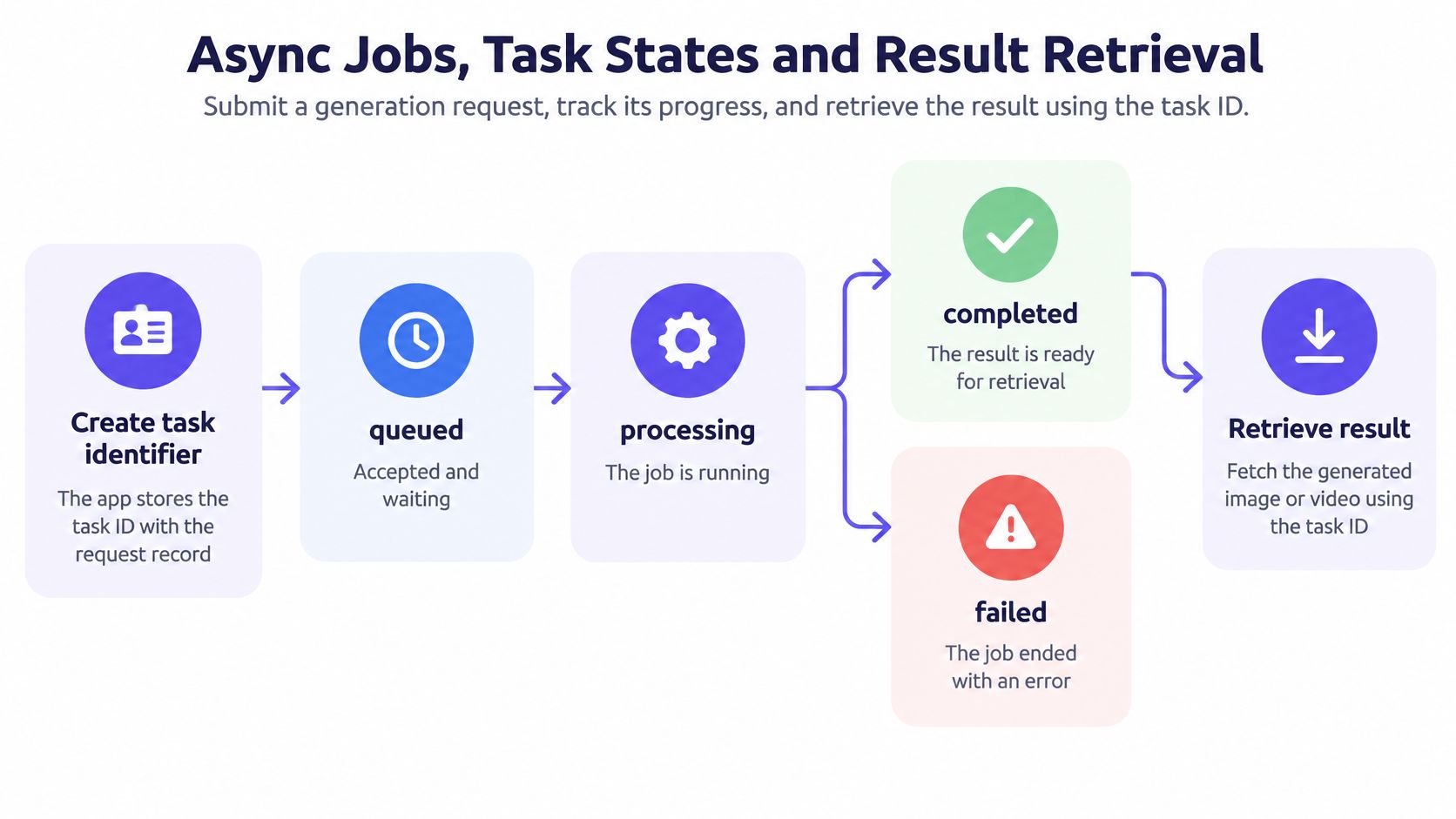
The create call returns a task identifier, and your application writes it to the same request record that holds the prompt and the model. From there the job reports one of five states, and each one asks something different of your code.
| State | Meaning | What the app does |
|---|---|---|
| queued | accepted and waiting for capacity | keep the task ID and poll on a schedule |
| running | generation in progress | wait, and enforce a timeout sized for the modality |
| succeeded | output is ready | download and store the asset immediately |
| failed | generation did not complete | read the error category before any retry |
| expired | output is no longer retrievable | regenerate, and don't treat it as a missing result |
The expired state catches teams out because it looks like a bug in their own system. It isn't. Providers keep result files for a bounded window, and that window is short. On UberLLM, image links stay live for about 15 minutes, and video and music result files are kept for about 3 hours after the job finishes. A polling loop that checks every ten minutes and acts on the next deploy cycle will miss image links entirely.
Retrieval runs on two mechanisms, and mature systems use both. Polling covers the deliveries a webhook lost, and it's the only option when your service can't expose a public endpoint. Webhooks cut wasted requests by telling you exactly when the state changed, which matters when a job takes a minute rather than a second. The trade-offs between webhooks and polling come down to failure handling: webhooks fail when your receiver is down, and polling fails expensively when your interval is too tight.
Polling intervals should follow the modality, not the codebase. A single fixed loop that works for a 4-second image job wastes dozens of calls on a video job that runs for a minute or more.
Text responses stream back token by token, while image and video jobs hand you a task you poll or a webhook reports as ready. That difference is architectural, not cosmetic: the request that returns instantly still owns work that hasn't finished, and someone has to remember it. Log the state transition times as well as the final state, because the gap between queued and running is where capacity problems show up before they reach users.
Model Selection Criteria and How to Test Them
Public rankings score models on prompts nobody in your product will ever send. They measure sample quality under conditions you don't control, and they say nothing about latency tails, refusal consistency or how outputs drift between builds. A test set built from your own image categories tells you more in an afternoon than a leaderboard tells you in a month, and it survives the next model release.
Evaluation has to be a measurable behavior, not a taste call. Formal evaluation programs treat image generation the same way a load test treats throughput: defined protocols, fixed inputs and scored outputs rather than reviewer impressions. A production API should log the same reproducible dimensions on every call: prompt category, model and version, seed where available, resolution, latency, failure mode and safety outcome. Log latency per request so the tail stays visible, because a healthy median can sit on top of jobs that hang long enough to hit your timeout.
| Criterion | How to measure | Pass signal |
|---|---|---|
| Prompt adherence | scored review of a fixed prompt set per category | required objects, counts and colors appear in most outputs |
| Perceptual quality | blind side-by-side review by the team | reviewers pick outputs without knowing which model made them |
| Text rendering | prompts that require exact words or labels | words are spelled correctly in most samples |
| Identity consistency | the same subject across several generations | the face, product or character stays recognizable |
| Refusal behavior | prompts that should be refused | refusals are consistent and fall into clear categories |
| Reproducibility | repeat calls with the same seed and model version | outputs stay close when seed and version match |
Score each row separately. An aggregate number hides a model that renders product labels perfectly and refuses every prompt containing a child, or one with beautiful portraits and text that reads like a CAPTCHA. The failure that hurts is always category-specific, and averaging it into a single score is how it reaches production unnoticed.
Routing adds a governance problem that the model test won't catch. When a marketplace or failover layer swaps providers, the replacement must carry equivalent moderation guarantees, or the result has to be explicitly marked as having different assurance characteristics. Silent relaxation of safety checks is the worst possible failover behavior: nothing errors, and the output just arrives with weaker review behind it. Keep moderation decisions and model versions in the audit record, and expose error categories your application can branch on.
Sample size that works in practice: a few dozen prompts per category for a first pass, with the exact prompts and outputs saved to a repo. Rerun the whole set whenever a model version string changes, not whenever someone complains.
That last point is the one teams skip. A model identifier can point to a new build without any change on your side, so the test set isn't a launch artifact, it's a regression suite that runs on every release cycle. When the results go to stakeholders outside engineering, a plain-language walkthrough of what a single model does, explained by ImagesArt AI, gives that conversation a shared baseline before the scoring debate starts.
Checking Edit Fidelity and Provenance Before Launch
A good-looking edit is not a successful edit. Editing has to be scored twice, once for whether the requested change happened and once for whether everything else stayed where it was, and shipping on the first score alone is how you get a product photo where the model redrew the logo.
The research supports the split. The HQ-Edit paper introduces Alignment and Coherence as separate metrics and reports that fine-tuning improved Alignment by 12.3 points and Coherence by 5.64 points in one evaluated system. Two numbers moving independently is the whole argument: an output can follow the instruction and still destroy the parts you needed preserved, or preserve everything and ignore the instruction.
The acceptance test I'd run before launch:
- Pick 20 to 30 source images that include faces, printed text, logos and busy backgrounds. Cropped product shots alone will pass a model that falls apart on a face.
- Write one instruction per image and record the expected change in the same row. Ambiguous instructions produce arguments about results rather than findings.
- Mask the edited region and diff the rest against the source. The pixels outside the mask are your preservation score, and a numeric diff settles what eyeballing can't.
- Score alignment and preservation in separate columns, then look at the cases where they disagree. Those are the prompts that need rewording or the model that needs replacing.
- Push every output through resizing and format conversion, then confirm that watermarks or content credentials survived. Provenance that dies in your CDN pipeline is provenance you never had.
- Confirm the provider's content policy and any disclosure duty that applies in the markets you ship to. Policy varies by provider, and a routed request can land under a different one.
- Log the chain of custody from source file to delivered asset, including which model version handled it.
Step five is the one teams discover late. Credentials and invisible watermarks are evidence about origin, not proof that a depicted event is true. Reliability depends on trusted identities, on the signing process, and on whether every downstream step preserves the metadata, so resizing, cropping and re-encoding all need a check. A provenance signal improves traceability, and it cannot establish factual authenticity or confirm that the rights are cleared.
The uncomfortable conclusion for anyone building an editing feature: provenance metadata answers "where did this come from," and it never answers "is this claim accurate" or "do we have the license." Those stay legal and editorial questions.
If the editing surface is the product, treat region preservation as a hard gate rather than a quality score. A photo editing API guide is a useful companion for the endpoint and parameter side, and this AskYourQA guide to AI testing helps structure the scoring so alignment and preservation don't collapse into one impression.
Latency, Errors and Retry Behavior in Production
Most image API comparisons rank per-image price and sample quality, then stop. Latency tails, failure rates and recovery behavior are the numbers that decide whether your feature feels broken, and they're the numbers nobody publishes. One image generation benchmark states outright that latency and observed uptime are reserved for a future phase, while an independent test found providers generally don't publish actual latency figures and had to measure response times, error rates, cold starts and throughput itself, as the API Benchmarks image generation analysis documents.
Measure percentiles, not averages. Track p50, p95 and p99 separately for synchronous and asynchronous image calls, then add timeout rate, cold-start penalty, time from create to retrievable result, and successful-output rate. A single average hides the tail that users experience, which is the two seconds where most requests land and the forty where a few don't.
Timing surprises are usually about modality. In our test on 29 October 2026, a 5-second Kling 3.0 clip took about 80 seconds to generate. Nothing was wrong; video just costs minutes where images cost seconds, and a timeout copied from the image path will cancel jobs that were progressing normally.
| Symptom | Likely cause | Fix |
|---|---|---|
| Tasks stay in running past the timeout | slow or unavailable provider | cancel, then retry with the same idempotency key or reroute if available |
| Duplicate images after a network timeout | create call retried without an idempotency key | send an idempotency key with every create request |
| 429 responses during bursts | rate limit reached | back off exponentially with jitter and queue requests |
| 503 responses | provider or route temporarily unavailable | retry later with a cap, and fail over only if safety guarantees hold |
| 402 responses | balance or payment check failed | top up the balance, then resend the same request |
| 404 responses | model identifier or route not found | check the identifier against the current catalog |
| Image link no longer loads | signed URL has expired | download on succeeded and store the file in your own storage |
Retry only what's retryable. A 429 or a 503 is transient and deserves exponential backoff with jitter and a hard cap. A 402 or a 404 will fail identically forever, so fix the balance or the model identifier first. Our API refuses calls with 402, 404, 429 and 503, and the category is the signal, not the HTTP status alone.
The contrarian read on cost: the cheapest per-image API is often the most expensive in production. Retries, failed generations and unpredictable tail latency push work back into your application and users back out of your funnel.
Reliability is already a purchasing criterion, at 37% of organizations, behind cost optimization at 58%, model availability at 49% and speed at 41%, according to the same benchmarking analysis. And the marketplace trade-off is real: routing across providers reduces outages, but it also adds variance in queue time, regional performance and safety-filter delay. Every rerouted request should be measured as its own route, with its own percentiles, or the aggregate dashboard will hide exactly the path that's failing.
How to Integrate an Image API Step by Step
A production integration is a short list of decisions, and most of them are about records rather than requests. Here's the sequence that survives contact with real traffic.
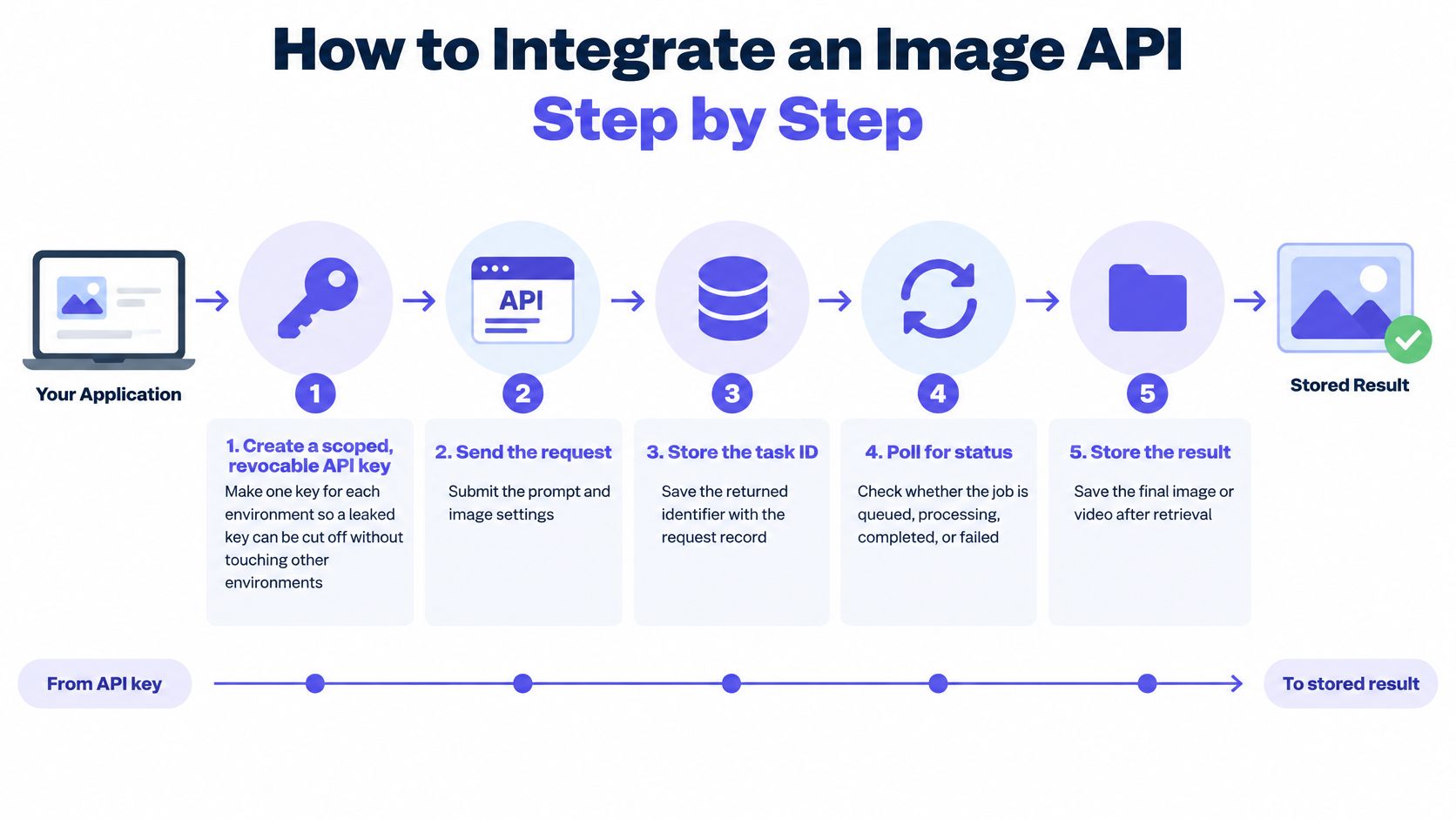
- Create a scoped, revocable key for each environment. Separate keys mean a leaked staging credential can be revoked without touching production traffic.
- Point your existing client at the new base URL. The OpenAI-compatible base is the UberLLM OpenAI-compatible base URL, and because the platform accepts both OpenAI and Anthropic wire formats, existing clients work once the base URL and credentials change. Confirm which image endpoints you depend on are supported before you cut over.
- Copy the model identifier as a full string from the current catalog. Switching models then changes exactly one value, which is a one-line diff instead of a refactor. Provider-native ids work the same way, such as
fal-ai/kling-video/v3/standard/text-to-video. - Validate size and aspect ratio locally, attach an idempotency key, then send the create call. The cheap checks belong on your side of the network.
- Store the task identifier with the request record, then poll or register a webhook. If the process dies between create and store, you've paid for an output nobody can find.
- On succeeded, download the asset, verify the checksum and save it to your own storage. Waiting until the next user request to fetch the file is how expiring links turn into support tickets.
- Log the model identifier, the state, the duration and the error category for every job. Those four fields answer most production questions without a debugging session.
- Exercise the failure paths before launch, including a 429, a request timeout and an expired link. Untested retry code usually doubles the duplicate-image count rather than reducing it.
A short walkthrough is worth more than the field list for the first build, especially around retrieval:
What a working integration looks like at the end of this: every job has a state, every successful job has an asset in your bucket, and every asset has a logged model version beside it. That's the whole standard. It's also the difference between a demo that impressed someone in March and a feature you can still debug in November.
Billing Units and How to Compare Real Costs
Two APIs can both say "per image" and still bill you differently, because the unit, the size dependency and the failure policy all change the arithmetic. Compare the unit first, then compute cost per usable output.
| Modality | Usual billing unit | What to check |
|---|---|---|
| Text generation | input and output tokens | input and output are priced separately |
| Image generation | per image or per megapixel | model and output size change the unit cost |
| Image editing | per edit or per output image | whether the source image adds a charge |
| Video generation | per clip or per second, depending on provider | billed at the final price once generation completes |
| Music and speech | per track, per minute or per character | the unit each model actually uses |
| Failed jobs | charged per attempt, or not charged at all | whether failed generations appear on the invoice |
Per megapixel pricing punishes large outputs in a way per-image pricing doesn't. A model that looks cheap at 1024×1024 can cost several times more at print resolution, so compare at the size your product renders rather than at the size in the marketing screenshot.
Video needs its own line in the forecast. A clip billed at its final price once generation completes is easier to project than one metered while it runs, because you're forecasting finished outputs rather than wall-clock uncertainty. Edits are the sneaky row: check whether the source image is charged as an input, since a retouching workflow that sends a 4 MB source on every call can move the unit cost well past the advertised edit price.
Failed generations are the line item that ultimately decides between two vendors. Take 1,000 image jobs at a 5% failure rate. If failed jobs are billed, you pay for 1,000 jobs to receive 950 usable images, which is roughly 5% more per usable image than the sticker suggests. If failed jobs aren't billed, you pay for 950. Same headline price, different effective price.
The formula I'd use for a monthly estimate: expected volume × unit price × retry factor, plus a buffer for edits and video. The retry factor is the number that separates a forecast from a wish.
Then compare unit prices against your own acceptance test rather than the vendor's sample gallery. If you want the underlying logic of token, image and clip pricing in one place, this breakdown of AI pricing models explains how each unit is metered.
Run a Test Call Before Choosing Your Model
A test call should answer more than “Does this image look good?” Check whether the model meets your quality bar, how it handles edits, and how its response behaves under expected load. A strong sample image cannot tell you how the API will perform in production.
Choose one candidate for text-to-image and one that supports editing. Keep the prompt set fixed across candidates so you can compare outputs on the same tasks. With UberLLM, you can switch models by changing the model identifier while keeping the API key and endpoint.
Test in order: first, score outputs against your selection criteria; next, run the edit acceptance test if your feature edits images; then measure p50 and p95 latency at expected concurrency. Finish by calculating cost per usable output, including retries. A model that misses the quality bar does not need a load test.
Save prompts, outputs, and request logs in your repository. When you change a model identifier or version, rerun the same set and compare results. For edits, inspect whether the result preserves the source details your application needs; a visually plausible image can still alter identity or other important features.
Go or no-go: Promote a model only if it passes the quality, edit, and load tests at expected volume. Ship behind a feature flag and keep a second candidate available for failover. If it fails, test the next candidate against the same set.
Price belongs in the decision, but it should not lead it. UberLLM lists Nano Banana 2 image generation at $0.015 per image, compared with a list price of $0.10 per image. For video testing, UberLLM recommends Kling 3.0 Standard as a starting point for text-to-video or image-to-video. Image and video requests return a task that you can poll or track through a webhook, so include the time to completion and result retrieval in your test.
UberLLM provides text, image, video, music, and speech models through OpenAI- and Anthropic-compatible interfaces. Use its playground to compare image outputs, then run the same test prompts through your application's API client. Evaluate quality, edit fidelity, latency, and cost per usable result together before choosing a model.